Vertical Browser Tabs: Chrome’s Shift Everyone Is Talking About
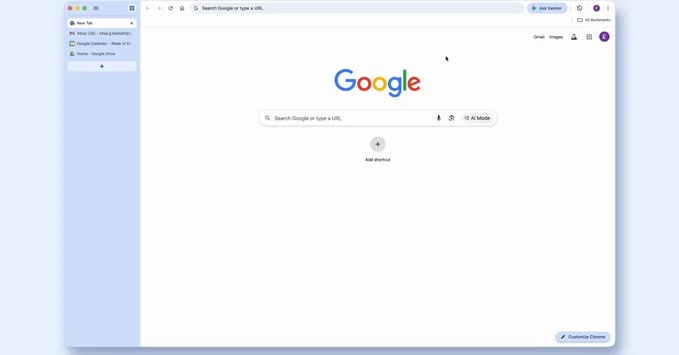
Many users are asking what Vertical Browser Tabs are and why they suddenly matter in Chrome updates. Vertical Browser Tabs in Google Chrome are a new layout option that moves your open tabs from the top bar to a vertical sidebar for easier navigation. This design helps users who manage many tabs, offering better organization, faster switching, and less visual clutter compared to traditional horizontal tabs. If you have been wondering whether Chrome’s new tab layout is worth switching to, the answer depends on how you browse daily and how many tabs you keep open.
Why Vertical Browser Tabs Matter in Chrome
Vertical Browser Tabs are becoming a popular feature because modern browsing habits involve juggling dozens of open pages at once. This makes the traditional top tab bar feel cramped and harder to manage efficiently. By shifting tabs into a side panel, Chrome gives users a clearer view of everything they have open at a glance.
How Chrome’s Vertical Browser Tabs Improve Productivity
Productivity improves significantly when Vertical Browser Tabs are enabled in Chrome. Users can scan tab titles more easily and switch between tasks without losing context. The vertical layout also supports better multitasking, especially for research, work, and content creation. This small design change can make a noticeable difference in daily workflow efficiency.
Vertical Browser Tabs vs Traditional Tabs
Traditional browser tabs sit horizontally at the top of the screen, which can quickly become overcrowded. When too many tabs are open, users often struggle to find what they need. Vertical Browser Tabs solve this by stacking tabs in a scrollable sidebar that remains organized even under heavy usage. This makes it easier to reduce clutter and improve focus while browsing.
Who Should Use Vertical Browser Tabs in Chrome
Not every user needs Vertical Browser Tabs, but many will benefit from trying them. Students, researchers, developers, and digital marketers often keep large numbers of tabs open at once. For these users, the vertical layout reduces confusion and improves navigation speed. If you mostly browse casually with only a few tabs, the benefit may be less noticeable.
The Future of Browser Layouts
Vertical Browser Tabs may signal a broader shift in how browsers handle multitasking and user experience. As screen sizes and workflows evolve, browser interfaces are adapting to support more efficient organization tools. Chrome continues to experiment with layouts that reduce clutter and enhance usability across devices. This trend suggests future browsers may prioritize flexible layouts over static designs.
Why Vertical Browser Tabs Feel Like a Big Upgrade
One of the biggest advantages of Vertical Browser Tabs is how naturally they fit into modern widescreen displays. Instead of stretching tab titles across a narrow bar, the sidebar format gives each tab more readable space. This improves recognition speed and reduces mistakes when switching between similar pages.
Another key benefit is how Vertical Browser Tabs improve focus by minimizing visual noise. When users are not overwhelmed by cluttered tabs, they can concentrate better on the task at hand. This makes a meaningful difference for people who spend long hours working inside the browser.
As more users discover this layout, it is likely to become a standard option across major browsers. The shift shows that even small interface changes can significantly impact how people interact with the web. Vertical Browser Tabs represent a simple but powerful step toward more efficient digital browsing.
Ultimately, Vertical Browser Tabs are not just a cosmetic change but a practical upgrade for everyday browsing. They help reduce stress caused by tab overload and make it easier to stay organized across multiple tasks. For users who rely heavily on their browser for work, study, or entertainment, this feature can quickly become essential. While it may take a short adjustment period, most users find the vertical layout far more intuitive and efficient over time, especially on modern widescreen displays today.











Comment