
Alerts
-
5 minutes, 36 seconds
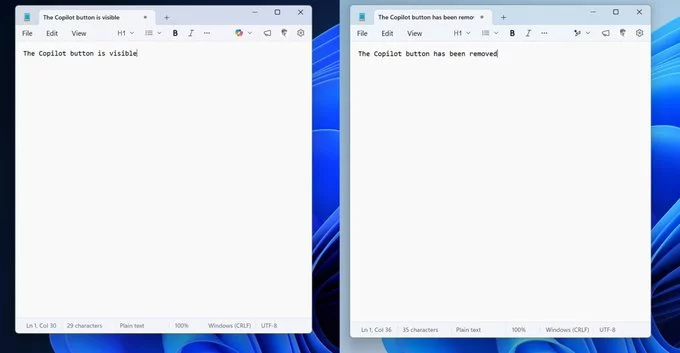
Microsoft Copilot removal from Windows 11 apps is already underway, and many users are noticing cleaner interfaces across built-in tools. If you’ve recently opened apps like Notepad or Photos and found fewer AI buttons, you’re not imagining things. Microsoft has started quietly rolling back Copilot integrations in several default apps. This change reflects a broader rethink of how AI should appear in everyday workflows—less intrusive, more purposeful.
The initial rollout of Copilot across Windows 11 aimed to embed AI assistance everywhere, from note-taking to image editing. However, user feedback suggested that constant visibility of AI tools wasn’t always helpful. In some cases, the Copilot buttons cluttered the interface without offering immediate value.
Microsoft appears to be responding by simplifying app layouts and reducing unnecessary distractions. Instead of forcing AI features into every corner, the company is shifting toward a more intentional approach. This strategy prioritizes usability and ensures AI is only present where it genuinely enhances productivity.
Several popular Windows 11 apps are already seeing changes as part of the Copilot removal process. Notepad, long valued for its simplicity, is returning to a cleaner design without prominent AI prompts. Similarly, the Snipping Tool and Photos app are losing visible Copilot buttons that once offered quick AI-powered actions.
Widgets, another area where Copilot was integrated, are also being streamlined. The goal is to create a more focused experience that doesn’t overwhelm users with options. While AI features may still exist in the background, they are no longer front and center in these apps.
This move doesn’t signal the end of Copilot in Windows 11. Instead, it marks a transition toward smarter, context-aware AI integration. Microsoft is likely exploring ways to make Copilot more adaptive—appearing only when users need it rather than remaining constantly visible.
This approach aligns with evolving trends in software design, where minimalism and user control are becoming more important. By reducing visual noise, Microsoft can make its apps feel faster, cleaner, and easier to navigate. At the same time, AI remains available for those who actively seek it.
For everyday users, the Copilot removal may feel like a welcome improvement. Apps load with fewer distractions, and workflows become more straightforward. Those who rarely used AI features will appreciate the cleaner interfaces, while power users can still access advanced tools when needed.
This change also highlights Microsoft’s willingness to adapt based on real-world usage. Rather than sticking rigidly to its original vision, the company is refining its strategy to better match user expectations. That flexibility could play a key role in shaping the future of Windows 11.
The removal of Copilot buttons is part of a larger shift in how Microsoft approaches AI across its ecosystem. Instead of pushing AI into every interaction, the company seems focused on making it more meaningful and less intrusive. This could lead to deeper, more useful integrations in apps where AI truly adds value.
As AI continues to evolve, user experience will remain a critical factor. Microsoft’s decision suggests that successful AI adoption isn’t just about adding features—it’s about knowing when to step back. By refining its approach, the company is positioning Copilot as a helpful assistant rather than a constant presence.
Microsoft Copilot removal ultimately points to a more refined Windows 11 experience. By stripping away unnecessary elements, the platform becomes easier to use and more visually appealing. This shift reflects a growing understanding that simplicity often leads to better productivity.
For users, the message is clear: AI is here to stay, but it won’t dominate every interaction. Instead, it will evolve into a quieter, smarter companion—ready when needed, but out of the way when it’s not.










Comment