
-
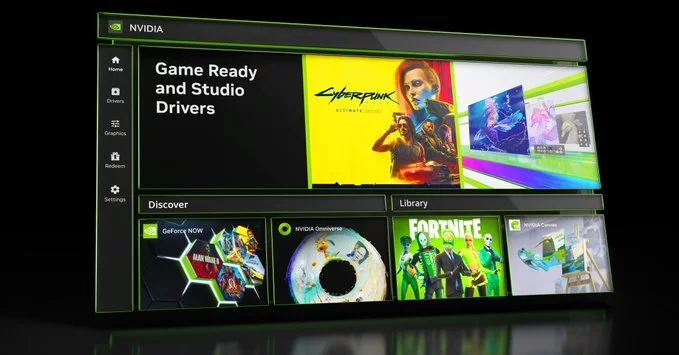
Nvidia has officially retired its GeForce Control Panel app after 20 years of dedicated service. The company first announced plans to replace the legacy app more than two years ago with a new, unified Nvidia app. Now, all major Control Panel features for GeForce users have been fully ported over, marking the end of an era for PC gamers and enthusiasts.
According to Nvidia, “With the introduction of our most recent Nvidia App update, all actively supported Nvidia Control Panel features for GeForce users have been modernized and transitioned to the new client.” The legacy app will remain installed on PCs unless a driver clean install is performed. However, it will no longer receive new features or security fixes. For users who still need it, the Control Panel will remain available via the Microsoft Store, but it is effectively frozen in time.
While GeForce users must switch to the Nvidia app, Nvidia RTX PRO users will continue to have access to the classic Control Panel until all professional features are migrated. This ensures that enterprise and workstation users face no disruption during the transition period.
Nvidia has been gradually porting features over the past year. The new Nvidia app has become an all-in-one solution that simplifies driver management, game optimization, and graphics settings. Here are the major capabilities now available:
Users can download the latest Nvidia app from the official Nvidia website or via the Microsoft Store. Once installed, all previously configured Control Panel settings are automatically imported, ensuring a seamless transition. Nvidia recommends performing a clean driver installation to fully remove the legacy app.
Coinciding with the Control Panel retirement, Nvidia has released a new Game Ready driver (version 610.47). This driver is optimized for the upcoming launch of 007 First Light and also adds support for Lego Batman: Legacy of the Dark Knight. Gamers can expect improved performance and stability for these titles.
The retirement of the GeForce Control Panel represents a significant shift in how Nvidia manages GPU settings. By consolidating all features into a single, modern app, Nvidia aims to provide a more streamlined user experience. This move also ensures that future features—such as AI-powered optimizations—can be delivered more quickly and consistently.
For more details, visit the official Nvidia website or follow Tom Warren’s coverage on The Verge.

2.5K articles

1.4K articles

34 articles

28 articles












Comment