
Alerts
-
2 minutes, 15 seconds
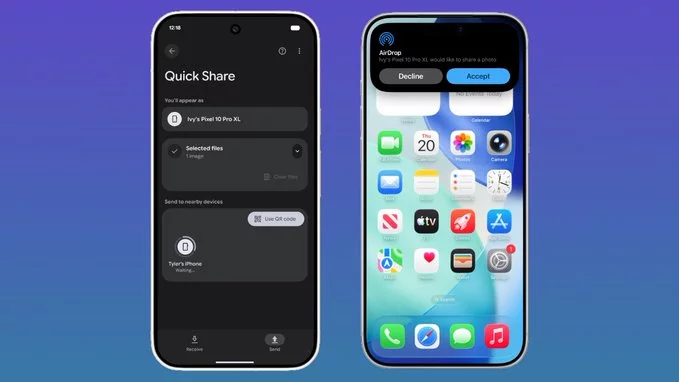
Google has officially expanded its AirDrop-style file sharing feature, called Nearby Share, to more Android phones. This update means you can now quickly send photos, videos, documents, and more between Android devices without needing an internet connection. In this article, we explain what changed, which phones are supported, and how you can use this feature to share files seamlessly.
Nearby Share is Google’s answer to Apple’s AirDrop. It lets you share files wirelessly between Android devices using Bluetooth, Wi-Fi, or ultra-wideband technology. The feature is fast, secure, and works without a data plan.
Previously, Nearby Share was limited to newer Android devices (Android 6.0 and above) with Google Play Services. Now, Google has extended support to a wider range of Android phones, including many budget and mid-range models. This includes devices from brands like Samsung, Xiaomi, Oppo, Vivo, and Realme.
Using Nearby Share is simple. Follow these steps:
Expanding Nearby Share to more phones means faster, more convenient file transfers between Android devices. You no longer need third-party apps like ShareIt or Xender. Plus, it works offline, so you can share files even without Wi-Fi or mobile data. This is especially useful for sharing large files like videos or presentations.
Nearby Share uses encryption to protect your files. You can choose who can see your device (hidden, contacts only, or everyone). This gives you control over your privacy while sharing.
Google continues to improve Nearby Share. Future updates may include faster speeds, better cross-device compatibility (like with Chromebooks), and integration with more apps. For now, the expanded support makes Android file sharing more accessible than ever.
If you own a compatible Android phone, try Nearby Share today. It’s a simple, secure way to send files without cables or internet.










 to More Android Phones – What You Need to Know)
 to More Android Phones – What You Need to Know)
Comment