
-
4 minutes, 42 seconds
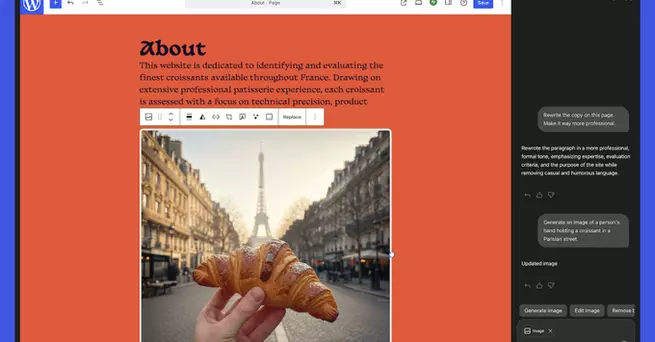
WordPress is giving website owners a powerful new way to manage their sites. Starting this week, users can interact with a built-in AI assistant that edits content, generates images, translates text, and even reorganizes site layouts—all with simple prompts. This addition promises to simplify website management for beginners and professionals alike, answering a common question: how can I make updates to my site faster and smarter?
The new AI assistant integrates directly into WordPress’s site editor. Users will find a sidebar where they can prompt the AI to perform a variety of tasks. Whether it’s editing text blocks, suggesting headlines, or tweaking page layouts, the AI responds almost instantly.
By leveraging Google’s Nano Banana technology, the AI can also generate and edit images on demand. This removes the need for external image tools and allows users to keep all content management under one roof. For businesses and creators, this could significantly speed up the process of publishing fresh, visually appealing content.
One of the AI assistant’s standout features is its ability to translate content effortlessly. Users can prompt the AI to rewrite text in different languages while keeping tone and style consistent.
Additionally, the AI can offer suggestions for improving existing content. From enhancing readability to proposing catchy headlines, it acts like a virtual editor, helping users optimize their site for engagement and search visibility without needing professional copywriting skills.
WordPress 6.9 introduced a “block notes” feature, which now works hand-in-hand with the AI assistant. Users can tag the AI with “@ai” inside block notes to issue specific commands. This enables precise edits, such as updating a paragraph, revising a headline, or restructuring a section of a page.
This system gives website owners more control while maintaining a conversational workflow. Instead of hunting through menus or plugins, users simply tell the AI what they want, making updates faster and more intuitive.
The AI assistant is an opt-in feature. To activate it, users need to navigate to their site settings and toggle on “AI tools.” Sites built with WordPress’s AI website builder, launched last year, have the tools enabled by default, so new users get immediate access.
Once activated, the AI becomes a constant helper within the site editor and media library, ready to assist with content, images, and structural changes. This flexibility allows even small businesses or hobbyists to maintain a professional-looking site without hiring outside help.
This launch represents a major step toward AI-driven website management. By integrating AI directly into the editing workflow, WordPress reduces barriers for non-technical users while giving experienced creators more speed and precision.
Whether updating a personal blog or managing a commercial website, the AI assistant makes editing faster, content creation simpler, and site organization smoother. For many, this could redefine how websites are maintained, cutting down hours of work into a few simple commands.
WordPress’s AI assistant brings site editing into the future, letting users focus on creativity while the AI handles routine tasks. With instant editing, translation, image generation, and block-level control, managing a website has never been this seamless.

2.5K articles

1.4K articles

34 articles

28 articles













Comment