Alerts

-
3 minutes, 43 seconds
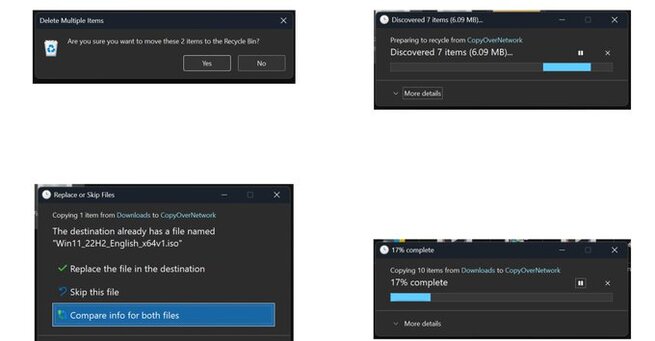
Microsoft is finally fixing one of the most persistent design issues in its operating system — and fans of dark mode will love this update. Windows 11’s dark mode is getting more consistent in File Explorer, bringing a more unified look to everyday file actions like copying, moving, or deleting.
For years, Windows users have complained about the inconsistent appearance of dialogs and menus when dark mode was enabled. While the File Explorer itself went dark, pop-up dialogs for copying or deleting files stubbornly stayed in light mode.
Microsoft began quietly testing improvements in August 2025 preview builds, and now the update is official. The company says these changes will ensure that File Explorer actions — from copy and move dialogs to progress bars — all match the dark mode theme.
Previously, when you copied a large file, Windows 11 would flash a bright, light-colored dialog box even if dark mode was on — a jarring experience for users who prefer a consistent, low-light interface.
With this update, those dialogs will finally stay dark. Microsoft is also updating confirmation, error, and progress dialogs to better blend with the rest of the system. This means every part of your file management workflow will now look cohesive and polished.
“We’re working on a more consistent dark mode experience,” Microsoft explained in the update notes, pointing to improvements in prompts for skipping, overriding, and file selection tasks.
Microsoft first introduced dark mode in Windows 10 back in 2016. But even after the launch of Windows 11, the feature felt incomplete — with mismatched menus and inconsistent UI elements breaking immersion.
Now, almost a decade later, Windows 11 is finally catching up to user expectations. The company’s renewed focus on design consistency suggests it’s listening to community feedback and prioritizing polish across the system.
While this may seem like a small tweak, it’s part of a larger push toward visual consistency in Windows 11. Alongside dark mode improvements, Microsoft has been refining animations, iconography, and transparency effects to create a smoother experience.
These subtle design updates make Windows 11 feel more modern and user-friendly — something that both casual users and professionals can appreciate.
The long-awaited update shows that Microsoft is still refining Windows 11’s look and feel — and that it’s paying attention to the details. With Windows 11’s dark mode getting more consistent in File Explorer, users can finally enjoy a cohesive, distraction-free visual experience that truly fits the modern OS aesthetic.










Comment