Alerts

-
3 minutes, 45 seconds
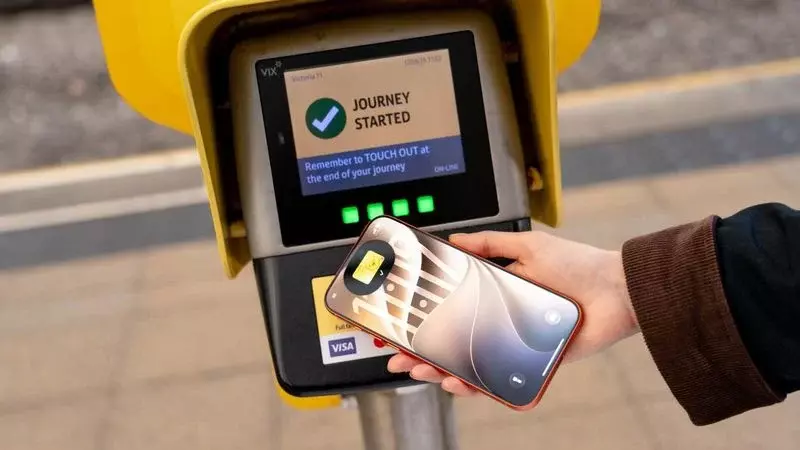
Transport for Greater Manchester first announced in August that the Bee Card could be added to Apple Wallet on iPhone and Apple Watch. At the time, the option was limited to younger riders using free or discounted Our Pass tickets, so it did not cover every Bee Network fare.
That restriction has now been lifted. As of Tuesday, the Bee Card is fully supported in Apple Wallet for all types of Bee Network tickets. Riders can add the card to their device and use it with tickets beyond the Our Pass offer, bringing Apple Wallet support to the network’s full range of ticket types.
Once added, the virtual Bee Card can hold bus and tram tickets purchased directly in Apple Wallet. When travelling on the Bee Network in Greater Manchester, riders can tap an iPhone or Apple Watch on a card reader to pay their fare. Apple Wallet support therefore lets passengers carry and use their Bee Network tickets on a compatible device, rather than relying on the earlier limited Our Pass availability.
Adding a Bee Card to Apple Wallet requires iOS 27. The expanded ticket support applies to Bee Network tickets, while the card can be added to either an iPhone or Apple Watch.
You can add a Bee Card to Apple Wallet on your iPhone or Apple Watch. Before you begin, make sure your iPhone is running iOS 27, which is required to add the card.
Once the card is added, it is available in Wallet as a virtual Bee Card. You can use it with Bee Network tickets, and when travelling in Greater Manchester, tap your iPhone or Apple Watch on a card reader to pay your fare. If you enable Express Mode, you won’t need to wake or unlock your device before holding it near the reader.
Once the Bee Card is in Apple Wallet, you can buy bus and tram tickets directly in the app and store them on the virtual card. This brings ticket purchase and storage together in Wallet, without needing to use a physical Bee Card for the tickets.
When traveling on the Bee Network in Greater Manchester, tap your iPhone or Apple Watch on a card reader to pay for your fare. The device is used to present the virtual Bee Card, where your ticket is stored. The same basic process applies whether you are traveling by bus or tram: buy the ticket in Apple Wallet, then tap your device on a reader when traveling.
For riders who want to use a ticket from Apple Wallet, the key step at the time of travel is to hold the iPhone or Apple Watch near the reader. Express Mode can make that interaction quicker: when it is enabled, you do not need to wake or unlock your device before holding it near the card reader. Without Express Mode, the Bee Card and its tickets remain available in Wallet.
Once your Bee Card is in Apple Wallet and you have a bus or tram ticket stored on it, you can use your iPhone or Apple Watch to pay for your fare at a Bee Network card reader in Greater Manchester. With Express Mode enabled, you do not need to wake or unlock your device before tapping. Simply hold your iPhone or Apple Watch near the reader to pay.
That means you can use the virtual Bee Card without first opening Apple Wallet or bringing up the card on screen. Express Mode is an option for making the reader interaction simpler: the device can remain asleep or locked as you hold it near the reader. The same process applies whether you are travelling with an iPhone or an Apple Watch.
Without Express Mode, the source article does not specify what steps are needed to use the card, so check your device’s Wallet settings for the available options. The key point is that enabling Express Mode removes the need to wake or unlock your iPhone or Apple Watch when you bring it close to the reader.








Comment