Alerts

-
3 minutes, 30 seconds
Apple’s iOS 26 Alarm Redesign Could Make You Oversleep
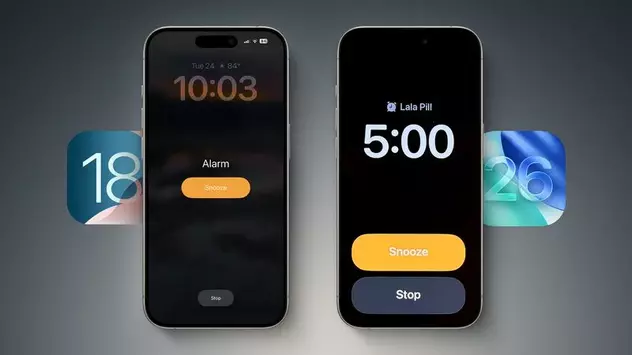
Apple's latest iOS 26 beta introduces a redesigned alarm interface—but users might want to proceed with caution. The new alarm screen in iOS 26 features a cleaner layout with larger buttons and a bigger time display. But the biggest change? The Stop and Snooze buttons are now the same size and placed side by side—something that could actually make it easier to oversleep, according to past internal Apple research.
New Alarm Design in iOS 26: What’s Changed?
In iOS 26, the Clock app’s alarm interface gets a visual refresh in line with Apple’s broader design updates. When an alarm goes off, you'll see two large buttons—Stop and Snooze—prominently displayed at the bottom. Compared to iOS 18, where Snooze was centered and Stop was smaller and harder to tap, the updated UI feels more symmetrical but may backfire for sleepy users. The redesign may look sleek, but its functionality is raising eyebrows among experts familiar with the previous design decisions.
Why the New Alarm Layout Might Backfire
Jack Fields, a former Apple engineer, explains that earlier testing revealed a key insight: when both alarm buttons are the same size and close together, users are 30% more likely to tap Stop by accident. This design flaw was initially fixed in prior versions of iOS by making the Stop button harder to reach—forcing users to be more alert before silencing their alarm completely. The iOS 26 beta appears to reverse this logic, potentially making it easier to turn off alarms while still half-asleep.
Is Apple Ignoring Its Own Research?
According to Fields, Apple once tracked alarm interactions using heat maps to log exactly where groggy users tapped. The goal was to prevent accidental alarm dismissal. “The new iOS 26 alarm design goes against everything those studies showed,” he says. “It’s terrifyingly large now.” While the UI is visually pleasing, it may undermine the very problem it originally solved—helping users wake up on time.
Bonus: Custom Snooze Time in iOS 26
Not all changes in iOS 26 are controversial. Apple has finally added the ability to customize your snooze duration—from 1 to 15 minutes. This long-requested feature replaces the default nine-minute snooze that has existed for years. Whether you need a quick power nap or a longer reset, this new flexibility is a welcome improvement—even if the rest of the alarm changes may take some adjusting.









Comment