Alerts

-
3 minutes, 28 seconds
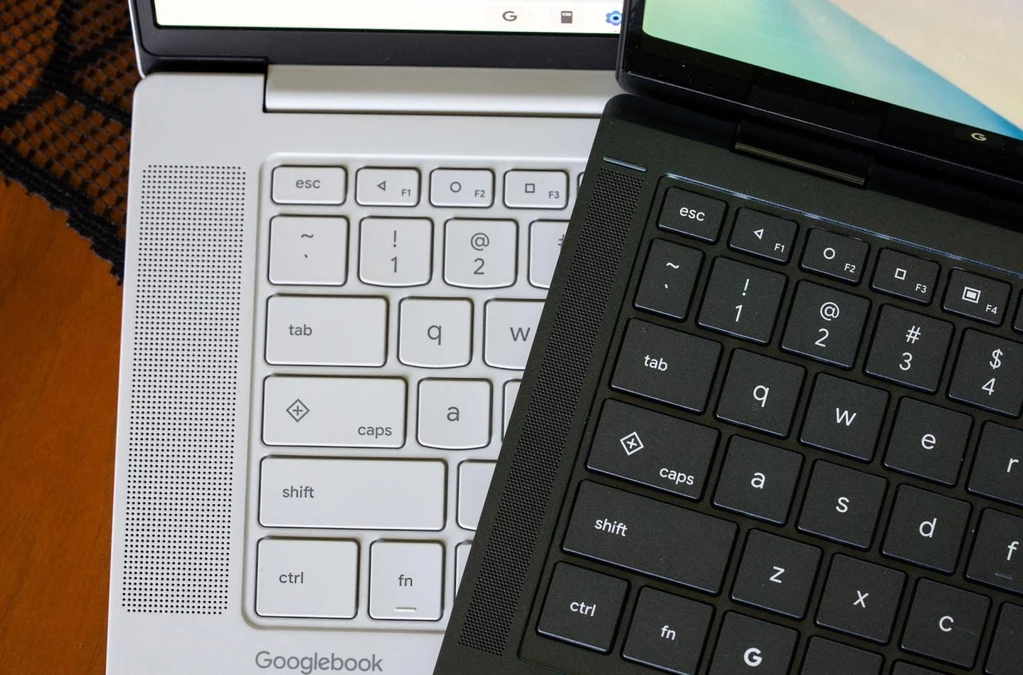
Googlebooks bring a familiar piece of Android history to the keyboard: physical navigation buttons reminiscent of the ones found on Android phones circa 2014. It is an old idea, but one that returns in a different form. Rather than appearing on a phone, these controls are part of the Googlebook’s keyboard, where they give users dedicated keys for navigating.
The throwback stands out because physical navigation buttons were once a recognizable feature of Android phones. Seeing the concept reappear on a laptop keyboard might make the Googlebook seem like it is borrowing from an earlier era of mobile devices. But the resemblance is not just a matter of nostalgia: the buttons are built into the keyboard itself, making navigation a physical part of the Googlebook experience.
There is also a distinction between this feature and the Quick Insert and Google logo keys. Those keys may look like new additions, but they first appeared a couple of years ago on some Chromebooks. The navigation buttons, by contrast, are the Android-era feature being brought back for Googlebooks.
On every Googlebook keyboard, the F1, F2, and other function keys have a new job: they serve as physical navigation buttons. They bring back the familiar Android arrangement of Back, Home, and Overview, like the buttons found on Android phones around 2014.
Rather than being separate controls beneath a screen, these navigation buttons sit on the keyboard. F1 is Back, F2 is Home, and F3 is Overview. That gives Googlebook users a direct way to move between pages, return to the home screen, or see their open apps without relying on touchscreen buttons.
The placement may look unusual on a laptop, but the idea is straightforward: familiar Android controls are available as physical keys. It’s a notable change to the function row, whose keys now handle basic navigation as well as their usual role. For anyone who remembers Android’s older three-button layout, the setup will feel recognizable, even though it appears on a Googlebook rather than a phone.
It’s easy to assume that the Quick Insert and Google logo keys are new additions to Googlebooks. They aren’t: both first appeared a couple of years earlier on some Chromebooks. So while the keys may be part of the Googlebook conversation now, they were already familiar to Chromebook users before Googlebooks arrived.
That distinction matters because the headline-grabbing return of Android-era physical navigation buttons is a separate development. The Quick Insert and Google logo keys were not introduced as part of that change, nor did they debut with Googlebooks. They have an earlier history on select Chromebooks.
In other words, there’s a familiar set of keyboard keys alongside a feature that recalls Android phones from around 2014. The keys themselves are not the new part; the older buttons are the detail that makes the Googlebook story feel like a throwback. Keeping those two ideas separate helps explain why talk of Quick Insert and the Google logo can sound like news, even though Chromebook users encountered them a couple of years ago.
The returning navigation buttons may feel like a throwback, but they serve a practical purpose. Googlebooks are built around a detachable keyboard, so users can take the screen off and use it as a tablet. In that mode, the physical keys aren’t available—and reaching for on-screen controls to move around is part of using the device.
That’s where the buttons on the side come in. They offer a familiar way to handle navigation when the keyboard is detached, bringing back a feature associated with Android phones around 2014. The idea is less about adding something flashy than making tablet use more convenient.
Googlebooks also have a home button, which gives the side controls another familiar touch. Together, these physical buttons make sense on a device that switches between laptop and tablet modes. They may be an old feature, but for a detachable device, they’re kind of a necessity.










Comment