
-
2 minutes, 41 seconds
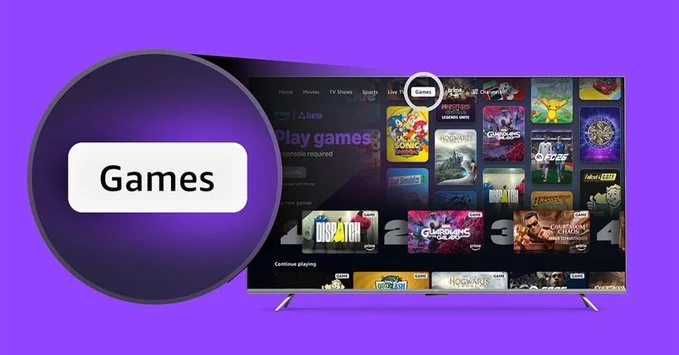
Amazon has taken a bold step by integrating its cloud gaming service, Luna, directly into Prime Video. Now, you can play popular games like Fallout 4 without needing a console or high-end PC. This move makes Amazon Luna cloud-streamed games more accessible to millions of Prime members, blending entertainment and interactive gaming in one place.
Amazon Luna is a cloud gaming platform that streams games directly to your devices. Instead of downloading large files, you play over the internet. By putting Luna inside Prime Video, Amazon lets you jump into games from the same app where you watch movies and TV shows.
This integration means you can start playing Fallout 4 or other titles with just a few clicks. It works on smart TVs, Fire TV sticks, and even some mobile devices. No extra hardware is needed—just a stable internet connection and a compatible controller.
This update is a game-changer for casual and budget-conscious gamers. Instead of buying a PlayStation, Xbox, or gaming PC, you can use your existing Prime Video subscription to access high-quality games. Here’s why it’s a big deal:
Amazon is starting with a strong lineup. Fallout 4 is a highlight, but you can also expect other popular titles. The library includes action, adventure, and family games. Amazon plans to grow this collection over time, making Prime Video a one-stop shop for entertainment.
Getting started is simple. Follow these steps:
If you’re a Prime member, you may get access to a rotating selection of games for free. For the full library, you can subscribe to Luna+ for a small monthly fee.
To avoid lag or buffering, follow these simple tips:
Amazon’s move shows that cloud gaming is becoming mainstream. By putting Luna cloud-streamed games inside Prime Video, they make gaming as easy as streaming a movie. This could attract millions of new players who never considered gaming before. It also puts pressure on rivals like Netflix and Google to innovate.
For now, if you’re a Prime member, you have a new reason to explore Prime Video. Try Fallout 4 or other titles and see how cloud gaming fits your lifestyle.

2.5K articles

1.4K articles

34 articles

28 articles













Comment