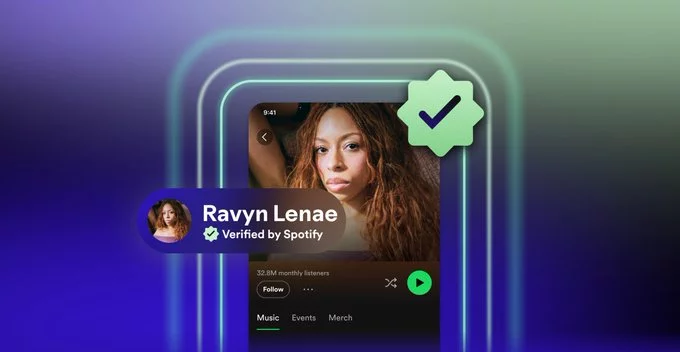
The Verified by Spotify badge now helps you know this artist isn’t AI, ensuring you’re listening to real human musicians. This new feature from Spotify addresses growing concerns about AI-generated music flooding the platform, giving listeners confidence that verified artists are authentic. In this article, we’ll explain what the badge means, how it works, and why it matters for both fans and creators.
What Is the Verified by Spotify Badge?
The Verified by Spotify badge is a small checkmark icon that appears on an artist’s profile. It signals that Spotify has confirmed the artist is a real human or a legitimate group, not an AI-generated entity. This badge is part of Spotify’s broader effort to maintain trust and transparency in music streaming.
Why Did Spotify Introduce This Badge?
With the rise of AI tools that can create convincing songs, listeners have become skeptical about whether their favorite tracks are made by humans. Spotify introduced the badge to:
- Combat AI-driven content that mimics real artists.
- Protect genuine musicians from being overshadowed by fake profiles.
- Help fans discover authentic music without confusion.
How Does the Badge Work?
Spotify uses a combination of manual review and automated checks to verify artists. The process includes:
- Checking official documentation (like IDs or business records).
- Reviewing the artist’s social media presence and music distribution history.
- Ensuring the artist’s content meets Spotify’s authenticity guidelines.
Once approved, the badge appears on the artist’s profile page, search results, and playlists. This makes it easy for you to spot real artists at a glance.
What Does This Mean for Listeners?
As a listener, the badge gives you peace of mind. You can trust that the music you’re streaming comes from a human creator. This is especially important for genres like indie, folk, or classical, where personal expression is key. For example, if you see the badge on a rising singer-songwriter’s profile, you know their songs are original and not AI-generated.
How to Check if an Artist Is Verified
Finding the badge is simple:
- Open the Spotify app or website.
- Search for an artist’s name.
- Look for a blue checkmark next to their name on the profile page.
If you don’t see the badge, it doesn’t mean the artist is AI—it just means they haven’t been verified yet. Many legitimate artists are still in the process of applying.
Tips for Artists: How to Get the Verified Badge
If you’re an artist, here’s how you can apply for verification:
- Claim your Spotify for Artists profile.
- Complete all required information, including a bio and photos.
- Submit your request through the Spotify for Artists dashboard.
- Ensure your music is distributed through an official distributor (like DistroKid or TuneCore).
Spotify typically responds within a few weeks. Once verified, you’ll gain more visibility and credibility with fans.
Why This Matters for the Music Industry
The Verified by Spotify badge is a step toward preserving artistic integrity. As AI becomes more advanced, platforms like Spotify must adapt to protect both creators and consumers. This badge also encourages ethical AI use—for example, AI tools that help with production but don’t replace human creativity.
In the long term, this feature could set a standard for other streaming services. It shows that authenticity is a priority, not an afterthought.
The Verified by Spotify badge is a simple but powerful tool. It helps you know this artist isn’t AI, so you can enjoy music with confidence. Whether you’re a fan looking for genuine talent or an artist wanting to stand out, this badge is a win for everyone. Keep an eye out for that blue checkmark—it’s your sign of real music.











Comment