Alerts

-
9 minutes, 43 seconds
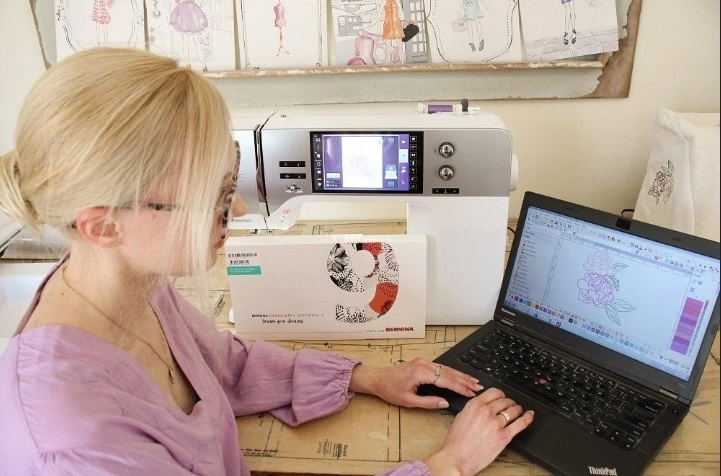
You have a beautiful logo. It looks crisp on your website. It prints perfectly on paper. So you assume it will stitch out just fine. Then you send it to your embroidery machine, and disaster strikes. The letters are jagged. The curves look like stairs. And your machine is snapping thread every three seconds. What went wrong? You skipped the real work of JPG to DST Conversion . That process is not the same as vector tracing. It is not auto-punching. It is a completely different beast. And if you think vector art is enough, you are about to waste a lot of thread and stabilizer.
Let me walk you through why vector files lie to embroiderers and how you actually master the switch from a simple JPG to a stitch-ready DST file.
Vector art is smooth. It uses math to draw perfect curves. Programs like Adobe Illustrator or CorelDRAW make everything look seamless. But an embroidery machine does not understand math the same way. It only understands stitches. A needle punches holes. Thread connects those holes. That means every curve in your design becomes a series of tiny straight lines. If your vector art is too thin or too detailed, the machine will try to follow it exactly. And that is where the trouble starts.
Vector files also ignore fabric behavior. They do not care about pull compensation. They do not account for thread thickness. A sharp point that looks great on screen will often turn into a bunched-up mess on a polo shirt. I have seen beautiful vector logos turn into twisted knots because the digitizer assumed the vector was ready to sew. It is not. Vector is just a map. DST is the actual road.
DST is the most common embroidery file format for commercial machines like Tajima and Barudan. Unlike a JPG or even a vector file, DST stores stitch commands. It tells the needle where to start, where to stop, when to jump, and when to trim. That means you cannot just trace a JPG and call it a day. You have to decide stitch types for each section.
A solid area might need a tatami stitch. A border might need a satin stitch. Small text requires a completely different approach than large lettering. And none of these decisions come from the original JPG image. They come from your knowledge of embroidery. A good conversion replaces guesswork with intentional choices. It asks questions the JPG never answers. How dense should this fill be? Should the underlay go first? Does this shape need a pull compensation of 0.2 millimeters or 0.4? Vector does not care. You have to.
Online tools promise one-click JPG to DST magic. They are lying. I have tested over a dozen of them. Most produce garbage. Here is why.
First, they ignore stitch angle. A human digitizer knows that a fill stitch should flow along the natural curve of a shape. Auto tools just fill with whatever default angle looks okay on screen. On fabric, that means thread breaks and weird shading.
Second, they do not handle underlay. Underlay is the skeleton of your embroidery. It stabilizes the fabric before the top stitches land. Auto tools either skip underlay completely or apply a generic one that does nothing useful. The result is sinking stitches and visible fabric peeking through.
Third, they cannot read texture. A JPG has no depth. It does not know that a dark shadow in the logo is actually a separate color stop. It just sees pixels. So it creates unnecessary color changes, jumps across the design, and adds trims that shred your machine’s productivity. Manual JPG to DST conversion fixes all of that by letting you assign stitch types, underlay patterns, and color stops based on real sewing logic.
Start with a clean JPG. That means high contrast, no compression artifacts, and a solid background. If your logo is a blurry mess at 200 percent zoom, the DST will be worse. Clean it up in any photo editor first. Remove shadows. Flatten colors. Then import that JPG into a real digitizing program like Wilcom, Hatch, or Pulse. These tools cost money because they save you hours of manual editing later.
Next, trace manually. Do not use auto-trace unless you enjoy editing thousands of nodes. Hand tracing gives you control over every curve. Keep points smooth and sparse. Too many nodes create jerky stitch paths. A good rule is to use the fewest points needed to hold the shape.
Then assign stitch types. Fill goes in large areas. Satin goes on borders and letters. Run stitches go on fine details. Do not mix them randomly. Each stitch type behaves differently on fabric. Satin stretches. Fill compresses. Test on a scrap piece of the actual garment material before you run fifty shirts.
Set your pull compensation. Fabric pulls under the needle. That means a perfect vector circle will stitch out as an oval. You have to widen the shape slightly in the direction of the pull. For knits, add more compensation. For wovens, add less. There is no universal number. You have to learn your machine and your material.
Finally, simulate your stitch path. Most digitizing software includes a simulator. Watch it run before you ever touch fabric. Look for long jumps, unnecessary trims, and overlapping stitches. Fix those in the software. That step alone eliminates ninety percent of sewing problems.
Not everyone needs to master JPG to DST conversion themselves. If you run a small embroidery shop and punch three designs a week, learn it. The control pays off fast. But if you are a brand owner or a print-on-demand seller, outsource. Professional digitizers charge twenty to fifty dollars per design. That sounds expensive until you factor in your own time, wasted materials, and broken needles. A good digitizer will also deliver a DST file that sews out perfectly on your specific machine brand. That is value you cannot get from a tutorial.
The key is knowing which parts of the process you enjoy. I love the puzzle of converting a messy JPG into clean stitches. My friend hates it and outsources everything. We both make good money. Do not let pride force you into bad work.
Vector art is a beautiful lie. It promises perfection but delivers confusion the moment thread hits fabric. Real embroidery success comes from mastering JPG to DST conversion the right way. That means manual tracing, smart stitch assignment, pull compensation, and actual testing. Auto-converters will not save you. They will only increase your scrap pile. So take the time to learn the fundamentals. Buy proper software. Practice on cheap fabric. And remember that every professional digitizer started exactly where you are now. They just refused to believe that a clean vector was enough. Now you know better too.


8.3K articles

2.7K articles

1.6K articles

34 articles








Comment