Big News for Retroid Pocket 6 Users: Official LineageOS Support
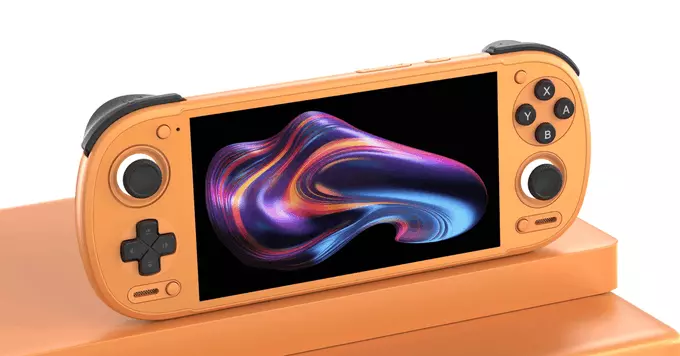
The Retroid Pocket 6 now officially supports LineageOS, bringing a major upgrade to this popular handheld gaming device. This means you can now run a clean, fast, and customizable Android operating system on your Retroid Pocket 6, unlocking better performance, longer battery life, and more control over your device.
What Is LineageOS and Why Does It Matter?
LineageOS is a free, open-source operating system based on Android. It is known for being lightweight, secure, and free of bloatware. For handheld gaming devices like the Retroid Pocket 6, installing LineageOS can offer several benefits:
- Faster performance – Less background processes mean more power for your games.
- Longer battery life – Optimized system resources help your battery last longer during long play sessions.
- More customization – You can tweak the interface, install custom themes, and adjust system settings.
- Regular updates – Stay current with the latest security patches and features.
How to Get LineageOS on Your Retroid Pocket 6
Getting started is easier than you might think. The official support means you can follow a straightforward installation process. Here's a quick overview:
- Back up your data – Always save your important files before making system changes.
- Download the official LineageOS build for the Retroid Pocket 6 from the LineageOS website.
- Install a custom recovery like TWRP (Team Win Recovery Project) to flash the new OS.
- Flash the LineageOS ROM and follow the on-screen instructions.
- Reboot and enjoy your upgraded handheld gaming experience.
Pro Tip: Check Compatibility First
Before you begin, make sure your Retroid Pocket 6 model is fully compatible. Official support means most versions will work, but it's always smart to double-check on the official LineageOS device page.
What This Means for Gamers
For retro gaming enthusiasts, this is a game-changer. The Retroid Pocket 6 with LineageOS can run emulators more smoothly, handle demanding PS1, PSP, and even some Dreamcast titles with fewer hiccups. Plus, you can install apps from the Google Play Store without the usual clutter.
Comparison: Stock OS vs. LineageOS
- Stock OS: Pre-installed, may include extra apps, slower updates.
- LineageOS: Clean, fast, customizable, and officially supported.
The Retroid Pocket 6 official LineageOS support opens up new possibilities for handheld gaming. Whether you want better performance, more control, or just a fresh start, this is a great upgrade. Give it a try and see the difference for yourself.











Comment