
-
4 minutes, 5 seconds
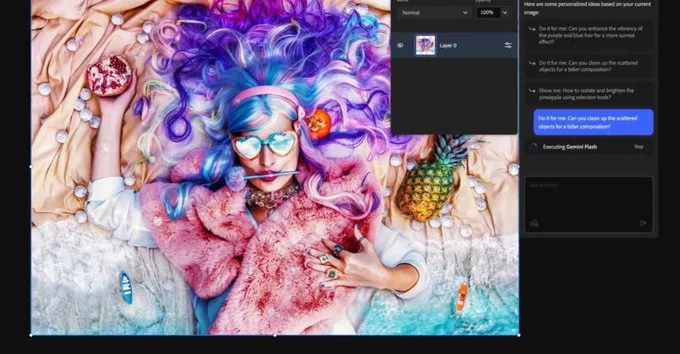
Adobe has rolled out a public beta of its AI assistant for Photoshop on web and mobile, letting users edit images just by describing changes. Curious about removing distractions, changing backgrounds, or adjusting colors without complex tools? The new Photoshop AI Assistant handles these tasks conversationally, transforming how both beginners and professionals approach editing.
The feature follows Adobe’s push to integrate AI agents across Creative Cloud apps, making image and document editing more intuitive. Users can now experience a guided, step-by-step interface or let the AI make automatic adjustments—whichever fits their workflow.
Using Photoshop’s AI Assistant is as easy as chatting. Users type or speak instructions like “brighten this area” or “replace the background with a sunset,” and the AI applies edits instantly. Adobe designed the assistant to learn from each request, offering helpful guidance to teach users while performing edits.
This conversational approach eliminates many traditional pain points of Photoshop, like navigating layers or complex adjustment menus. The AI can refine lighting, correct colors, and remove unwanted objects—all without opening multiple panels or tools.
Adobe isn’t stopping with Photoshop. Similar AI assistants are already live in Adobe Express and Acrobat, simplifying design and document workflows. Soon, these assistants will integrate with Microsoft’s Copilot service, giving users access to AI-driven editing directly within productivity apps.
By bringing AI agents to web and mobile platforms first, Adobe ensures accessibility for a wide range of users. While the full Photoshop desktop app isn’t fully equipped with this chatbot interface yet, Adobe has teased that AI agents are coming to desktop Photoshop and Premiere Pro, signaling a broader transformation across Creative Cloud.
The AI Assistant caters to both casual creators and seasoned designers. Beginners benefit from guided edits and voice commands, making professional-quality results achievable without extensive experience. Professionals can speed up workflows by letting AI handle repetitive tasks, like object removal or color correction, freeing up time for more creative decisions.
Additionally, the assistant’s step-by-step guidance helps users learn Photoshop techniques as they work. This dual function of productivity and education makes the AI Assistant a powerful addition for anyone who wants faster, smarter, and more intuitive editing.
Adobe’s AI Assistant signals a shift toward more conversational, accessible creative tools. Users can expect editing to become more interactive, with AI not just following commands but also suggesting improvements and learning preferences over time.
As AI integration expands across Creative Cloud, Photoshop and other Adobe apps may redefine how we approach visual storytelling. Whether you’re creating marketing materials, social media posts, or personal projects, the new AI Assistant makes professional editing simpler, faster, and more creative than ever.

2.5K articles

1.4K articles

34 articles

28 articles













Comment