Apple’s Mac-like multitasking tools are now on more iPads—here’s why they’re better than Stage Manager
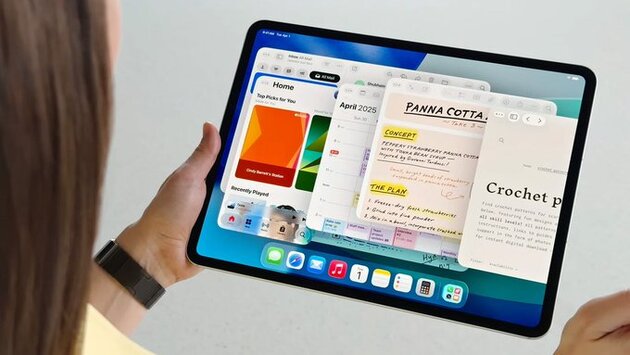
If you’ve ever felt limited by multitasking on your iPad, you’re not alone. The good news? Apple’s latest update, iPadOS 26, is here—and it brings a suite of Mac-like multitasking features that are rolling out to more iPads than ever before. While Stage Manager is expanding its reach, it's the other new tools—like window tiling, app resizing, and the familiar Mac menu bar—that are stealing the spotlight. For many users, these updates finally make the iPad a true productivity powerhouse.
More iPads now support Stage Manager with iPadOS 26
With iPadOS 26, Apple is broadening support for Stage Manager, its multitasking tool originally introduced in iPadOS 16. This feature groups apps into workspaces, allowing users to switch between them quickly. Previously limited to select iPad Pro and iPad Air models, Stage Manager now works on the iPad mini (5th gen or later), entry-level iPad (8th gen or later), and iPad Air (3rd gen or later)—essentially, any device that can run iPadOS 26. This makes advanced multitasking more accessible to casual users, students, and professionals alike.
Why Apple’s Mac-like multitasking features are more useful
Despite Stage Manager’s expanded support, many users—myself included—find Apple’s new Mac-style multitasking tools far more intuitive and powerful. iPadOS 26 introduces overlapping windows, window resizing, a persistent menu bar, and the iconic red-yellow-green traffic light controls. These changes let users manage their apps just like on a Mac, without relying on unfamiliar systems. It’s a smoother, smarter multitasking experience that finally makes the iPad feel like a capable laptop alternative.
Familiarity and flexibility improve productivity on iPad
One of the biggest benefits of these Mac-like multitasking features is how natural they feel. If you’ve used a Mac or PC, you’ll instantly understand how to manage windows on your iPad—there’s no learning curve like with Stage Manager. Whether you’re resizing two apps side-by-side, tiling them for optimal workflow, or using the menu bar for faster access to options, working on the iPad is finally seamless. These updates mean you don’t have to sacrifice function for portability anymore.
iPadOS 26 turns iPads into true productivity machines
Apple’s focus on enhancing the multitasking experience with iPadOS 26 shows it’s serious about making the iPad more than a media device. By expanding Stage Manager and introducing Mac-like multitasking tools, users get the best of both worlds: flexibility, power, and familiarity. If you’ve been on the fence about using your iPad for work or school, now’s the perfect time to give it another shot—these new tools truly change the game.














Comment