
-
4 minutes, 49 seconds
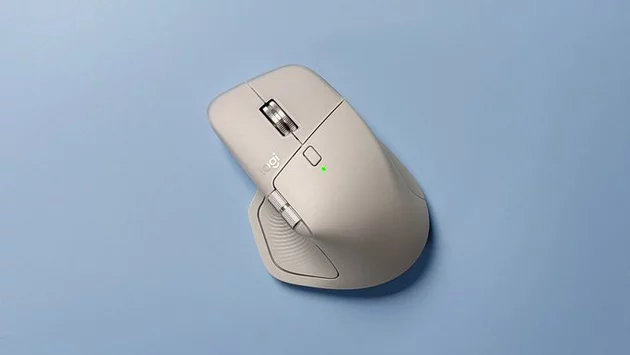
Choosing the right mouse can completely change your computing experience. Many users wonder: Is the Logitech MX Master 4 really the best mouse yet? After testing it extensively, the answer is a resounding yes. From comfort to advanced features, this new iteration of Logitech’s famed MX Master series raises the bar for productivity and everyday use.
For professionals, creatives, and anyone who spends hours at a computer, the MX Master 4 isn’t just a peripheral—it’s an essential tool that makes work feel smoother and more intuitive.
One of the first things you notice about the MX Master 4 is its ergonomic design. The smooth rubberized surface feels soft to the touch and resists dust, keeping the mouse looking and feeling clean. Its sculpted shape supports your hand naturally, reducing strain over long periods.
Unlike many mice that leave fingers cramped after a full workday, the MX Master 4 promotes a relaxed grip. Whether you’re editing documents, scrolling through spreadsheets, or designing graphics, it adapts to your hand effortlessly. Logitech has clearly taken years of user feedback into account, making comfort a priority without sacrificing style.
The MX Master 4 features Logitech’s latest high-precision sensor, allowing seamless tracking on virtually any surface. Gone are the days of jittery pointer movements or needing a mouse pad for accuracy. Whether you’re working on multiple monitors or switching between different screens, cursor control feels fluid and natural.
Gamers and designers alike will appreciate the responsiveness, which reduces frustration during fine-tuned tasks. This precision makes the MX Master 4 suitable not just for office work, but also for creative projects and detailed editing.
A standout feature of the MX Master series has always been its customizable buttons, and the MX Master 4 takes this to the next level. Each button can be programmed to execute macros, launch apps, or perform complex shortcuts with a single click.
The horizontal thumb wheel is perfect for switching between tabs, scrolling timelines, or navigating spreadsheets. With these tools at your fingertips, repetitive tasks become faster and more efficient. Logitech’s software makes customization intuitive, ensuring users of all experience levels can tailor the mouse to their workflow.
Battery life is another area where the MX Master 4 shines. A full charge can last weeks, and a quick one-minute charge provides hours of uninterrupted use. Connectivity is seamless across Bluetooth or the included USB receiver, making it easy to switch between devices without losing functionality.
This combination of durability, reliability, and convenience means you can focus on your work without worrying about interruptions. For professionals constantly on the move or those juggling multiple devices, the MX Master 4 delivers unmatched flexibility.
Logitech has a history of producing industry-leading mice, but the MX Master 4 sets itself apart with a perfect balance of comfort, precision, and productivity-focused features. It’s no wonder that longtime fans of the series, myself included, immediately recognize the upgrade.
Whether you’re a remote worker, a designer, or someone who simply wants the best mouse experience, the MX Master 4 delivers on every promise. It’s more than a peripheral—it’s a productivity companion that genuinely improves how you interact with your devices.

2.5K articles

1.4K articles

34 articles

28 articles














Comment