


Internet Archive Plugin Fixes Broken Links Automatically
-
5 minutes, 6 seconds
Internet Archive Launches WordPress Plugin to Combat Link Rot
WordPress site owners now have a new ally against broken links. The Internet Archive, in collaboration with Automattic, has released the Wayback Machine Link Fixer plugin, designed to prevent the frustration of “link rot.” This common problem occurs when hyperlinks become outdated or disappear, leaving visitors stranded on pages that no longer exist.
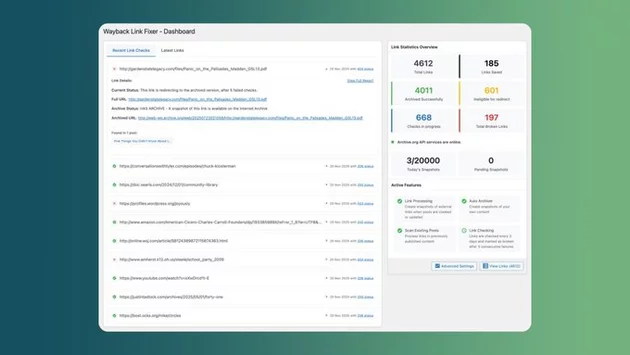
The plugin works quietly in the background, scanning your posts for dead links and automatically redirecting users to archived versions hosted on the Internet Archive’s Wayback Machine. For anyone who’s lost traffic or credibility due to broken links, this tool could be a game-changer.
How the Plugin Works to Keep Your Links Alive
Once installed, the Wayback Machine Link Fixer continuously monitors outbound links on a WordPress site. If a linked page goes offline, the plugin redirects visitors to a relevant snapshot stored on the Wayback Machine.
Even more impressively, if a page doesn’t yet have an archived version, the plugin creates one automatically. When links return to live pages, the plugin seamlessly restores them, ensuring your content always directs readers to the most accurate and accessible version.
This proactive approach doesn’t just protect your visitors—it safeguards your own content. Every time a post is updated, the plugin archives it, creating a consistent backup of your site’s history.
Why Link Rot Is a Growing Problem
Broken links aren’t just annoying—they can seriously impact user experience and SEO. Research indicates that 38% of links created since 2013 have become inactive, with older links from before 1998 failing at a staggering 72% rate. As websites evolve, content moves, and domains expire, link rot has become an unavoidable reality of the web.
For bloggers, journalists, and businesses, this can mean lost credibility, decreased engagement, and even search ranking penalties. The new Internet Archive plugin addresses these risks head-on by keeping links functional, relevant, and reliable.
Benefits Beyond Fixing Dead Links
The Wayback Machine Link Fixer isn’t just a “broken link patch.” It provides several advantages for WordPress site owners:
-
Automatic Archiving: Every post update is saved, creating a historical backup of your content.
-
User Experience Protection: Visitors never hit a dead end, maintaining engagement and trust.
-
SEO Advantages: Preserving functional links helps prevent search engines from penalizing your site.
-
Low Maintenance: Once installed, the plugin runs in the background, requiring minimal input from site owners.
This combination of automation and reliability makes it an essential tool for anyone managing large content-heavy websites.
Installation and Compatibility
Installing the plugin is straightforward. WordPress users can download it directly from the plugin repository, activate it, and configure basic settings. The tool integrates smoothly with most WordPress themes and doesn’t require advanced technical knowledge.
After setup, it starts monitoring links immediately. Site owners can view archived pages, manage redirects, and even trigger manual scans if needed. For publishers who regularly link to external resources, this can save hours of maintenance work while protecting both readers and SEO performance.
A Step Toward Preserving the Web
The Internet Archive has long been a guardian of the web’s history, but this plugin makes preservation practical for day-to-day website management. By automatically rescuing broken links and archiving content, it reduces the risk of lost information and keeps your website reliable for readers and search engines alike.
As the web continues to expand and evolve, tools like the Wayback Machine Link Fixer are crucial for maintaining a consistent and professional online presence. For anyone looking to safeguard their content against link rot, this plugin provides a simple yet powerful solution.



Contact Information





Suggested Writers
-

2.5K articles
-

1.3K articles
-

34 articles
-

28 articles



Comment