
Alerts
-
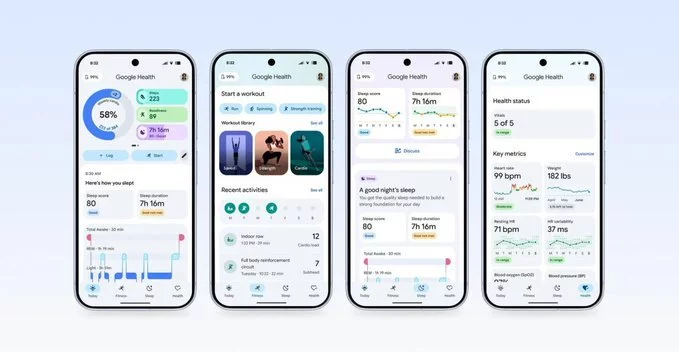
The transition from the Fitbit app to Google Health has been met with widespread frustration. As Google officially replaced the beloved Fitbit app with its new Google Health platform, many users are taking to forums and social media to express their confusion and disappointment. The new app, built around Google's AI coaching experience, has left many longing for the simplicity of the old interface.
One of the most frequent criticisms is the limited customization on the home screen. A Reddit user noted, "I can't even completely fill up my home screen. They only have 2 large tiles available and I can't just scroll down to see everything." This design change forces users to navigate through multiple tabs to view their health data, which was previously accessible with a single scroll on the Fitbit app.
The AI health coach has divided opinions. While some users find it beneficial—one commented, "When I ask it to design a moderate workout using my office gym equipment, circuit style, I usually end up feeling great afterwards"—others find it disruptive. A senior editor at The Verge reported that the AI started an unsolicited conversation about his daily plans. Many users have echoed this sentiment, calling the AI's chatty updates "AI slop" that obstructs their health data.
If you're struggling to locate your historical fitness data, you're not alone. The new app buries important metrics behind multiple menus. Here's how to find your old Fitbit logs:
To view your rowing workouts or other stored data from the Fitbit app, follow these steps: Go to the "Health" tab, scroll down to "Focus areas", select "Fitness", and then look for "Exercise days". In the old app, this information was visible by simply scrolling on the main "Today" page.
According to Google's support page, users with supported wearables will see two extra tabs: Fitness and Sleep. However, many third-party devices, like the Nothing Watch Pro 3, are not yet supported. Google has promised future compatibility, but for now, users without a Google wearable face a clunkier experience.
Unfortunately, there is no way to revert to the old Fitbit app. However, you can disable the AI coach feature to reclaim some screen space. Go to the app's Feature Privacy Controls and toggle off the AI health coach. This will remove the large activity window and chat prompts from your home screen, allowing you to focus on your stats.
Feedback on Google's help center has been overwhelmingly negative. One user wrote, "This app is a huge disappointment and a total time drain to get minimal results. How can I get back to using what worked?!" Another replied, "It's no longer a genuine fitness app." The consensus is that Google Health prioritizes AI interaction over clear data presentation, leaving many Fitbit loyalists feeling alienated.
Despite the backlash, Google Health is the new standard for Fitbit users. While the AI coach offers some useful features, the overall user experience needs refinement. As Google continues to update the app, users hope for more customization options and a return to data-first design. Until then, navigating the new interface will require patience and a few workarounds.










Comment