
Alerts
-
2 minutes, 50 seconds
Google Gemini AI Tools for Education Now Available to Students Under 18
Google is making a major push into classrooms with its latest rollout of Google Gemini AI tools for education, now available to students under 18 for the first time. In 2025, Google is expanding its AI-powered education suite, offering teachers powerful new features through Google Classroom and opening up NotebookLM to younger users. These updates aim to transform learning by making lesson planning easier for educators and study more interactive for students.
New Gemini Features Boost Teacher Productivity
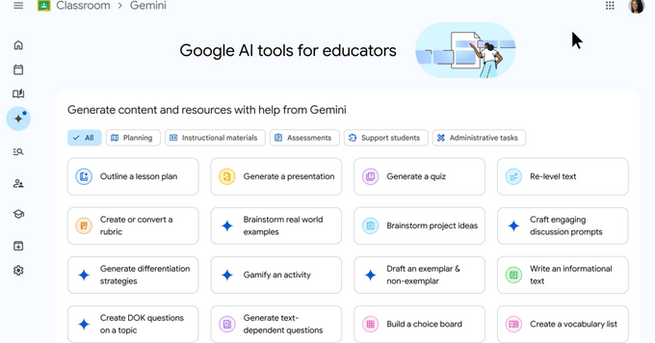
Educators with Google Workspace accounts will now find a dedicated Gemini tab in Google Classroom. This space offers AI assistance for generating lesson plans, solving math problems, and even drafting emails. Those on the Education Plus Edition get access to Gemini-powered audio lessons as well. A new Analytics tab also helps teachers identify students who are excelling or falling behind by tracking assignment completion and performance trends in real time—making intervention faster and more targeted.
NotebookLM Empowers Students with AI-Powered Study Tools
Google’s announcement also includes opening NotebookLM—its note-taking and research tool—to users under 18. This is a big step for students, as it enables AI-generated interactive study guides, podcast-style overviews, and personalized learning experiences based on content uploaded by teachers. Students can also interact with custom-built “Gems”—mini Gemini agents tailored to their curriculum—giving them extra help outside the classroom. Administrators will have the power to share these Gems with teachers across entire school districts.
AI Video Creation and Classroom Management Upgrades
Beyond Gemini and NotebookLM, Google is rolling out additional tools to support learning. New features include Google Vids for AI-generated video content, a Gemini-powered form creation assistant, and the now-live Class Tools platform. Class Tools lets teachers manage Chromebooks more effectively, such as pushing content to student screens or minimizing digital distractions during lessons. In addition, Google is introducing over a dozen new Chromebook devices, including updated models from Lenovo and Asus, built to support these next-gen classroom experiences.










Comment