Alerts

-
3 minutes, 13 seconds
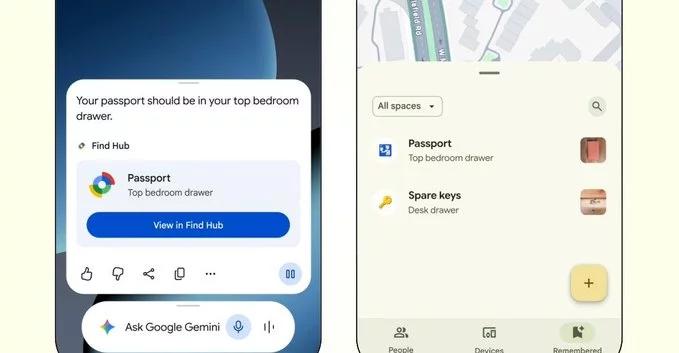
Losing track of important items is a common frustration, but a new capability in Gemini aims to change that. This feature allows the assistant to remember where you placed specific belongings, such as your keys or a passport, and then save that location directly within Find Hub. Rather than relying on vague recollections or manual notes, you can now ask Gemini to log the physical spot of an item during a conversation. Once saved, this information is stored in a centralized, dedicated space for easy retrieval later. The core benefit is that it offloads the mental burden of remembering, creating a reliable, searchable record of your possessions. By integrating this memory function with Find Hub, Gemini transforms from a simple conversational tool into a practical, location-aware assistant for your daily life. This seamless process ensures that when you need to locate something, the answer is just a quick query away.
Using the feature is straightforward. You simply tell Gemini in a natural sentence where you have placed a physical item—for example, “I left my passport in the top drawer of my desk.” The assistant then processes this verbal or typed instruction and saves the location to your linked profile.
This is not limited to a single object. You can repeat the process for any important possession, building a growing record over time. The system is designed to handle casual phrasing, so you do not need to use specific commands or fill out a form. After you make a request, Gemini confirms it has stored the information, and you can later ask, “Where is my passport?” to receive the saved answer.
Key point: The assistant only remembers what you explicitly ask it to remember. It will not automatically track your movements or guess where you put items without your direct instruction.
Every item location that Gemini remembers is automatically saved to your personal Find Hub. Think of it as a dedicated, centralized map view that consolidates all your tagged belongings in one place. Instead of digging through scattered notes or chat history, you can simply open Find Hub to see a visual overview of where everything you’ve asked Gemini to track is located.
This storage system is designed for easy retrieval. When you need to locate a specific item later, Find Hub lets you search or browse through your saved places. The hub is not just a list; it provides contextual details tied to each location, such as the date it was saved or relevant notes you may have added during the initial request. By keeping all this information organized and accessible, Find Hub ensures that the memory of your item’s location is never lost, turning a simple reminder into a permanent, searchable resource for future use.
The primary benefit of this feature is its ability to help you keep track of important items, directly reducing the time you spend searching for them. By offloading the mental burden of remembering where you placed everyday objects, you can focus on more productive tasks. This functionality is not just about convenience; it has practical implications for daily workflow, potentially decreasing frustration and improving overall efficiency.
However, the implications also extend to how you interact with your digital assistant. As you begin to rely on Gemini for this type of recall, the accuracy and security of your location data become paramount. The feature is designed to store these details in a centralized hub, but this also means you are entrusting the system with more personal information. Consequently, understanding how this data is managed and ensuring your privacy settings align with your comfort level will be essential as you integrate this tool into your routine.









Comment