Gemini Gems in Google Workspace: What’s New and Why It Matters
Google has officially rolled out Gemini Gems in Google Workspace, making its customizable AI assistants more accessible across Docs, Sheets, Gmail, and other apps. If you've been wondering how to integrate task-specific AI chatbots into your daily workflow, the answer is now built right into the side panel. Within the first 100 words of this update, users can already explore and use both pre-made and personalized Gemini Gems—without opening the standalone Gemini app.
How Gemini Gems Work in Google Docs, Sheets, and Gmail
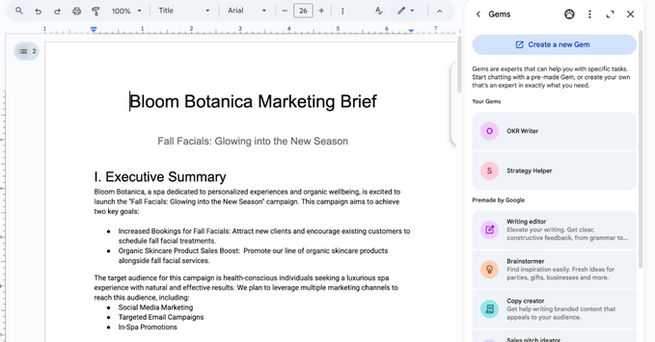
Previously confined to the Gemini app, these AI-powered chatbots are now seamlessly integrated into Google Workspace. Whether you're working on a sales pitch in Docs, revising spreadsheets in Sheets, or drafting emails in Gmail, you can summon a Gem tailored to your needs from the side panel. Users can interact with pre-configured Gems or access the ones they’ve customized for specific tasks like brand-focused writing, resume polishing, or customer support. You can even upload documents to a Gem for more accurate, context-aware assistance.
What You Can Do with Gemini Gems in Workspace
Think of Gemini Gems in Google Workspace as your AI coworkers. You can create Gems that help generate targeted social media content, streamline internal communication, or even simulate how a CEO might respond to messaging. For instance, marketers can build a Gem to generate product copy with their brand voice, while sales teams can develop one that tailors messages based on prospect data. And since these Gems support file access and @-mentioning, they integrate naturally into your existing workflows.
Availability and How to Create Your Own Gemini Gems
While you can’t build Gems directly inside Docs or Gmail just yet, Google makes it easy: head to gemini.google.com/gems/create or use the “Create a new Gem” option inside the Workspace side panel. The rollout began on July 2nd and will take up to 15 days to reach all users. If you're using Google Workspace and have Gemini access, this is your green light to start customizing your workflow with AI—without ever leaving the tools you rely on daily.














Comment