Canva AI 2.0 Update: What’s New and Why It Matters
Canva AI 2.0 update is redefining how people create designs by letting users generate and edit content using simple text prompts. Whether you’re designing social media posts, presentations, or videos, the platform now allows you to describe what you want and watch it come to life in seconds. This shift answers a common question many users have: can design really be this easy? With this update, the answer is increasingly yes.
The latest upgrade focuses on making creativity more accessible, even for users with no design background. By removing technical barriers, Canva is positioning itself as a go-to tool for both beginners and professionals looking to save time. The result is a faster, smarter, and more intuitive design experience.
Prompt-Powered Design Tools Take Center Stage
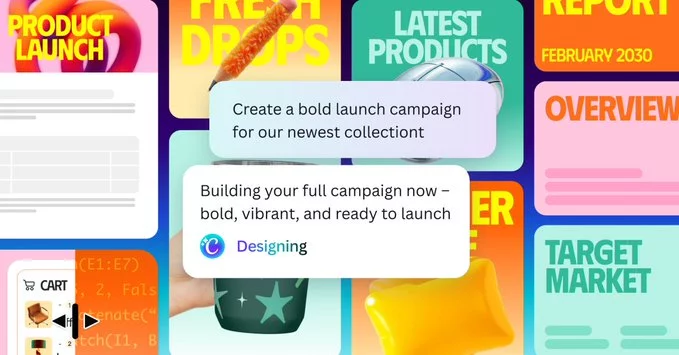
At the core of the Canva AI 2.0 update is its new prompt-driven workflow. Instead of manually adjusting layouts or searching for elements, users can simply type what they want. For example, you can request a “modern Instagram post with pastel colors and bold typography,” and the system will generate multiple options instantly.
This feature goes beyond basic generation. Users can refine designs by adding follow-up prompts, making edits feel more like a conversation than a technical process. It brings a level of flexibility that traditional drag-and-drop tools often struggle to match.
More importantly, this approach speeds up content creation significantly. What used to take hours can now be done in minutes, making it especially useful for creators, marketers, and small businesses working on tight schedules.
AI Editing Expands Creative Control
The Canva AI 2.0 update doesn’t just create designs—it also enhances editing. Users can now modify images, text, and layouts using natural language commands. Want to change the background, adjust colors, or rewrite text? Just describe the change, and the platform handles it.
This level of control helps bridge the gap between automation and personalization. Instead of relying on generic templates, users can fine-tune their designs to match their unique style or brand identity. The editing process becomes more intuitive, reducing the learning curve for new users.
Additionally, these AI-powered editing tools encourage experimentation. Users can try different ideas quickly without worrying about making irreversible changes, which often leads to more creative outcomes.
Canva AI 2.0 Update Boosts Productivity for Teams
For teams, the Canva AI 2.0 update introduces significant productivity gains. Collaboration becomes smoother when everyone can quickly generate and adjust designs without needing advanced skills. Team members can share prompts, iterate on ideas, and finalize projects faster than ever.
This is particularly valuable for marketing teams that need to produce large volumes of content across multiple platforms. The ability to create consistent, high-quality visuals at scale can make a noticeable difference in campaign performance.
The update also reduces dependency on specialized design roles for routine tasks. While professional designers remain essential for complex projects, everyday design needs can now be handled more efficiently across the team.
What This Means for the Future of Design
The Canva AI 2.0 update signals a broader shift in how digital design tools are evolving. Instead of focusing solely on manual controls, platforms are moving toward conversational and AI-driven experiences. This trend is likely to continue, with even more advanced features emerging in the near future.
For users, this means greater accessibility and fewer barriers to entry. Creativity is no longer limited by technical skills but guided by ideas and imagination. As AI continues to improve, the line between concept and creation will become even thinner.
Ultimately, Canva’s latest update isn’t just about new features—it’s about changing how people think about design. By making it easier to turn ideas into visuals, the platform is opening the door to a more inclusive and efficient creative landscape.













Comment