Asus Takes on Elgato with Its Own Secondary Touchscreen Display
Asus is making a bold move to compete with Elgato by launching its own secondary touchscreen display. This new accessory is designed to help streamers, content creators, and multitaskers boost their productivity without switching windows. By adding a compact, customizable screen, Asus aims to simplify workflows and enhance live streaming setups.
What Is the Asus Secondary Touchscreen Display?
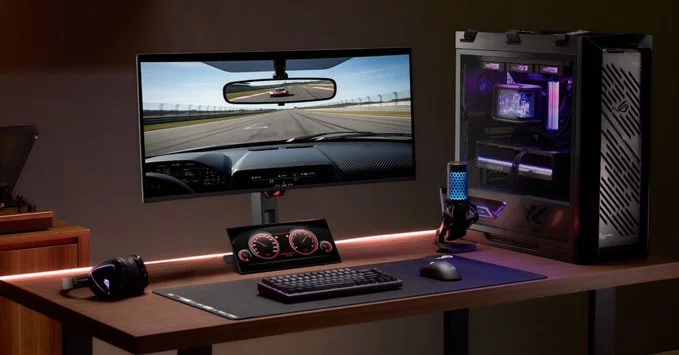
The Asus secondary touchscreen display is a small, portable monitor that sits next to your main screen. It acts as a control panel for apps, shortcuts, and live stream tools. Unlike traditional monitors, this touchscreen lets you tap, swipe, and drag to manage tasks quickly. It’s similar to Elgato’s popular Stream Deck but offers a larger, more flexible interface.
Key Features of the Asus Display
- Touchscreen functionality: Control software, adjust audio, or switch scenes with a tap.
- Customizable layout: Arrange buttons, widgets, and shortcuts to fit your needs.
- Seamless integration: Works with popular streaming software like OBS and XSplit.
- Compact design: Fits easily on most desks without taking up too much space.
- Affordable price: Expected to cost less than Elgato’s high-end models.
How Does It Compare to Elgato’s Stream Deck?
Elgato’s Stream Deck is a favorite among streamers because of its dedicated keys and simple setup. However, the Asus touchscreen display offers a larger canvas, which means you can see more controls at once. For example, you can create a full dashboard for your stream alerts, chat overlays, and scene transitions. While Elgato relies on physical buttons, Asus gives you a fully customizable touch interface that can change based on the app you’re using.
Which One Should You Choose?
If you prefer tactile buttons and a proven ecosystem, Elgato remains a strong choice. But if you want a more flexible, visual control panel with room to grow, the Asus display is worth considering. Streamers who manage complex setups—like multiple cameras, audio sources, and chat bots—will benefit from the extra screen real estate.
Tips for Using a Secondary Touchscreen Display
- Start simple: Add just a few key controls, like scene switching and audio mute, to avoid clutter.
- Use for non-streaming tasks: Keep email, calendar, or social media feeds visible to stay organized.
- Experiment with layouts: Try different widget arrangements to find what feels intuitive.
- Pair with hotkeys: Combine touch controls with keyboard shortcuts for faster workflows.
Final Thoughts on the Asus Secondary Display
Asus is entering a competitive space, but its touchscreen display brings fresh innovation. It challenges Elgato’s dominance by offering a more versatile tool for creators. Whether you’re a seasoned streamer or a beginner looking to upgrade your setup, this accessory could be a game-changer. Keep an eye on availability and pricing—it might just become your new favorite desk companion.











Comment