
Alerts
-
4 minutes, 27 seconds
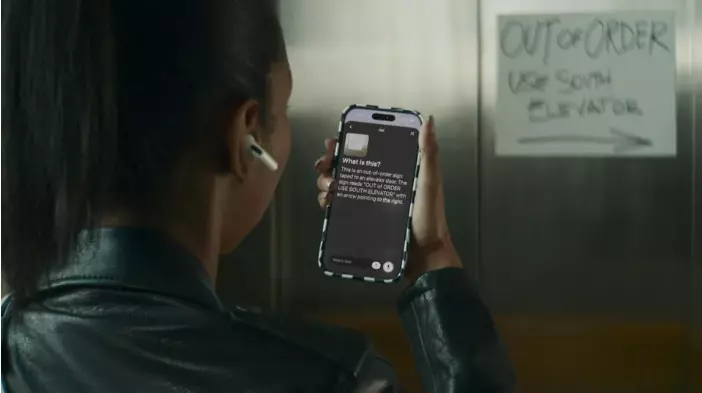
Apple's 2026 accessibility roadmap introduces powerful new tools, from AI-powered voice control to eye-controlled wheelchairs. These features are not just consumer gadgets—they are designed to help disabled people participate more fully in the workforce. On Global Accessibility Awareness Day (GAAD), Apple announced a slate of updates that directly address one of the biggest barriers to employment: inaccessible technology.
Apple's 2026 accessibility roadmap is a set of new features and products aimed at making its devices easier to use for people with disabilities. The centerpiece is Apple Intelligence, the company's on-device AI, which is now built into tools like VoiceOver, Magnifier, and Voice Control. These updates help users read documents, navigate apps, and control their devices using natural language instead of memorizing commands.
The disability employment gap in the United States is around 40 percentage points. Disabled workers are unemployed at more than twice the rate of non-disabled workers. One major reason? The everyday tools of work—like apps, documents, and meeting software—are often not built for everyone. When the technology you need to do your job doesn't work for your body or brain, you are locked out before you even apply.
Apple's new features aim to fix this. For example, natural language Voice Control can patch over poorly labeled enterprise software. If an app doesn't have clear buttons, users can still navigate it by saying what they want to do. This makes more jobs possible for more people—overnight.
One of the most exciting announcements is hidden beneath the AI news. Apple Vision Pro will now let users control compatible power wheelchairs using eye tracking. This feature, developed with TOLT Technologies and LUCI, is a huge deal for people with ALS, spinal cord injuries, or neuromuscular conditions. For them, independent mobility often requires expensive, custom hardware. Now, a consumer device that also runs Slack, Zoom, and Excel can control a wheelchair. That collapses the wall between assistive technology and productive technology.
Pat Dolan, who has lived with ALS for ten years, called this feature "gold." Independence of movement is a precondition for showing up to a job, a meeting, or a classroom.
Apple is also bringing on-device generated subtitles to uncaptioned video across iPhone, iPad, Mac, Apple TV, and Vision Pro. For deaf and hard-of-hearing users, this solves a persistent problem: personal videos, user-generated content, and workplace recordings often lack captions. The on-device piece is key. Captioning used to require sending audio to the cloud, which created privacy risks for medical consultations, family conversations, or confidential work meetings. Processing it on the device itself is a smart design choice—and one other platforms will likely copy.
It would be easy for HR leaders to treat this as consumer news and move on. But that would be a mistake. Here's why:
Tim Cook framed the announcement around Apple's commitment to privacy by design. But there is another frame worth using: participation by design. Every feature announced this week makes it easier for a disabled person to read, communicate, move, work, and contribute on their own terms. That is what accessibility infrastructure is for.
The disability employment gap will not be closed by a software update. It will be closed by employers, policymakers, and disabled leaders building systems of hiring, training, and career mobility that turn technological capability into real economic opportunity. Announcements like this one shift the baseline. They expand the set of jobs a disabled worker can do, the meetings they can join, and the careers they can build.










Comment