Adobe AI sound effects tool lets your voice create custom audio
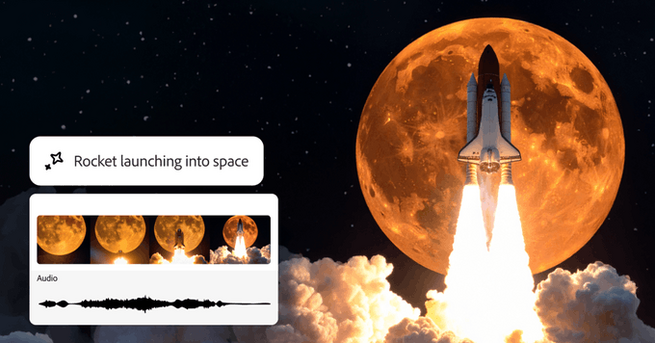
Creating sound effects just got a lot more fun and far less technical, thanks to Adobe's new AI-powered Generate Sound Effects tool. As part of Adobe Firefly’s latest beta features, this tool lets users mimic sounds like a rocket launch or footsteps using silly voice recordings and then transforms them into realistic audio effects. Designed for creators of all levels, this innovation responds to the growing demand for simple, generative tools that support everything from filmmaking to social media content. Whether you whisper "whoosh" or clap rhythmically, Adobe’s AI will provide four audio variations for you to choose from.
How Adobe AI sound effects tool works
Unlike traditional sound libraries or Foley recording sessions, Adobe's sound effects AI uses onomatopoeia and text prompts to generate audio. Users simply record themselves making a noise—like “clip clop” for a horse—and combine it with a text description such as “hooves on pavement.” The tool then creates synced sound clips that match the rhythm of an uploaded video. It’s a more intuitive, playful alternative to tools like Google Veo 3, giving creators hands-on control with a timeline-based interface to fine-tune results.
Adobe AI sound effects tool expands on previous experiments
This new feature evolves from Adobe’s earlier Project Super Sonic, which debuted during Adobe Max in 2024. While it doesn’t yet support speech synthesis, it can replicate common impact and environmental sounds such as twigs snapping, footsteps, or urban ambiance. The idea is to simplify the sound design process without compromising creative quality. Adobe also introduced enhanced video tools like Composition Reference and Keyframe Cropping to guide Firefly’s generative video output, offering more tailored, stylized results with presets including anime, claymation, and vector art.
What Adobe AI sound effects tool means for creators
Adobe is clearly positioning Firefly to be the go-to creative suite for AI-enhanced content production. While the AI-generated styles are still developing—some like “claymation” look outdated—the company’s openness to integrating third-party models shows its commitment to adaptability and growth. For creators, this means faster prototyping, less dependence on stock libraries, and more creative freedom. Whether you’re making short films, ads, or social videos, Adobe’s AI sound tools offer a low-barrier way to make content sound as good as it looks.













Comment