Article
Microsoft Excel adds Copilot AI to help fill in spreadsheet cells Microsoft Excel adds Copilot AI to help fill in spreadsheet cells, giving users a smarter way to organize and analyze data. The new feature allows you to generate summaries, classify information, create tables, and more with simple natural language prompts. It’s Microsoft’s latest st...
Read article
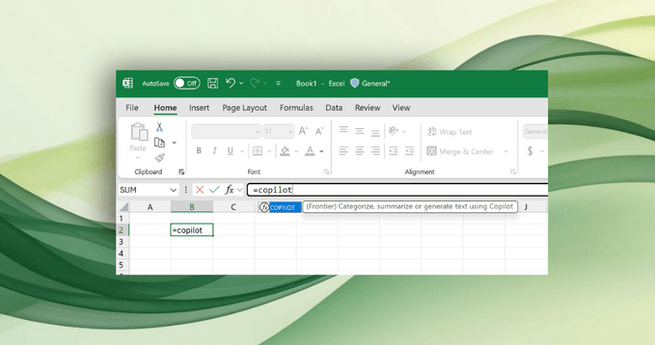
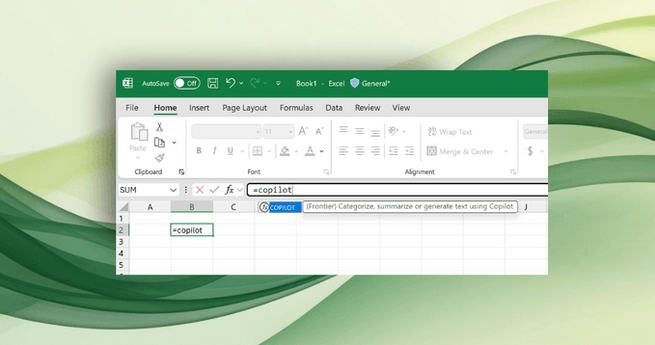
Microsoft Excel adds Copilot AI to help fill in spreadsheet cells Microsoft Excel adds Copilot AI to help fill in spreadsheet cells, giving users a smarter way to organize and analyze data. The new feature allows you to generate summaries, classify information, create tables, and more with simple natural language prompts. It’s Microsoft’s latest step in bringing AI automation directly into everyday productivity tools. How the new Copilot AI function works The feature introduces a new =COPILOT() function inside Excel. You can type a plain-language command, reference cells, and let the AI handle the rest. For example, if you have a column of customer feedback, Excel Copilot can instantly classify comments with a single prompt. A simple formula like:=COPILOT("Classify this feedback", D4:D18)will generate structured, AI-powered classifications right inside your spreadsheet. Beyond classification: Summaries, tags, and descriptions Microsoft has showcased other ways to use the Copilot AI function: Generate text: =COPILOT("Create a description for this product based on its specs", B2:B8) Summarize text: =COPILOT("Summarize this feedback", A2:A20) This makes repetitive tasks like tagging product reviews or summarizing survey responses much faster. Instead of copying data into another tool, Excel now lets you automate directly in your sheet. Powered by OpenAI, built for privacy The new Copilot AI runs on OpenAI’s GPT-4.1-mini model, an upgrade to Microsoft’s earlier LABS.GENERATIVEAI experiment from 2023. Microsoft emphasizes that data entered into Excel’s Copilot is never used for AI training, ensuring user privacy and confidentiality. Combining AI with traditional Excel functions Another advantage is flexibility. Microsoft notes that Copilot can be paired with existing formulas like IF, SWITCH, LAMBDA, or WRAPROWS to create more advanced workflows. This means Excel power users can blend AI with custom logic for even more control over their data. Why it matters With Google Sheets already rolling out similar AI features, Microsoft’s move ensures Excel remains competitive for business, academic, and personal use. By integrating Copilot AI directly into formulas, the company is making spreadsheets more intuitive and less time-consuming.

 Healthcare Branding: How to Build Trust and Grow Your Practice
 Airbnb Bans Mandatory Guest Chores Before Checkout
 Meta Muse Tops 10 Million Users as Shopping Drives Activity
 Recursive Launches Flint, a Free Laptop Coding Model
 Automattic Begins Layoffs After Board Upheaval and Exits
 GM’s New EV Platform Uses AI and Compute to Compete