
Alerts
-
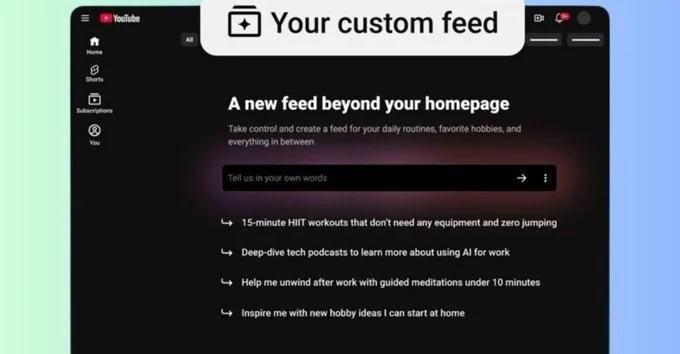
YouTube is rolling out a groundbreaking AI-powered feature that allows users to generate a personalized video feed based on simple text descriptions. Instead of scrolling through endless recommendations, you can now ask the AI to curate content around your specific interests, moods, or favorite topics. This custom feed can be pinned to the top of your YouTube homepage for quick access.
To access this feature, ensure you are signed in to the YouTube mobile app or desktop. Currently, it is available to US users with English language support. Click on the "Your custom feed" tab at the top of the homepage and enter a prompt into the AI text box. For example, you can type: "Help me unwind with guided meditations under 10 minutes" or "Deep-dive tech podcasts about AI." YouTube will then generate a curated feed matching your request.
Be specific about your desired content length, topic, or mood. You can edit your prompt anytime to refresh the feed. To see the tab, your search and watch history must be enabled in account settings.
This feature mirrors similar AI-powered customization tools seen elsewhere. Spotify offers prompted playlists, while Instagram lets users control their Reels feed algorithm via topic lists. YouTube’s approach stands out by using descriptive prompts for a more intuitive experience.
Like Spotify’s AI playlists, YouTube’s system interprets natural language to surface relevant content. Instagram’s Reels control uses preset topics, whereas YouTube allows open-ended prompts for greater flexibility.
You can edit your prompt at any time to generate a brand new space. If the AI produces irrelevant results, click the three-dot menu on the feature tab and select "Something wrong?" to report the issue. This feedback helps YouTube improve the algorithm.
To use the custom feed, your search and watch history must be enabled. This data helps the AI understand your preferences. You can adjust these settings in your account privacy controls.










Comment