Alerts

-
3 minutes, 27 seconds
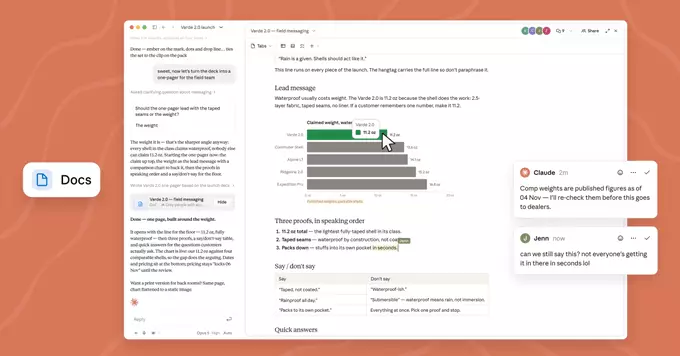
Claude can now create and edit documents and presentations directly within chats. Instead of switching between tools or manually building files from scratch, you can ask Claude to produce a document or presentation as part of the conversation you are already having.
This means the work happens where your thinking happens. You describe what you need, and Claude generates the file inside the chat, ready for you to review, refine, and use. Editing works the same way: you can request changes and Claude updates the document or presentation without you leaving the conversation.
For anyone who regularly moves between drafting ideas and producing finished materials, this removes a meaningful amount of friction. The gap between a conversation and a deliverable narrows considerably.
It is a natural extension of how people already use Claude: to think through problems, organise information, and turn rough input into something structured. Now that output can take the form of a document or a presentation, not just text in a chat window.
Everything starts in the chat. Instead of switching to a separate app, you describe what you need and Claude generates it directly in the conversation. From there, the document or presentation becomes something you can shape, not just read.
You can ask for changes in plain language, and Claude revises the file in place. Edits happen through the same chat thread, so refining a draft feels like continuing a conversation rather than operating a toolbar. Need a new section, a different structure, or tighter wording? Just say so.
Because the file lives alongside the conversation, the context you built while prompting stays useful as you iterate. That makes the chat the single control point for both creating and editing.
This feature enables seamless document and presentation work without leaving the chat. Instead of switching between separate applications, you can move directly from conversation to creation, keeping your momentum and your context intact.
Key advantages include:
For teams and individuals alike, this means less friction between thinking and producing. You can iterate on a document or deck right where you planned it, refining content as the conversation evolves rather than copying text back and forth between tools. The result is a smoother, more focused workflow in which the chat itself becomes your workspace for both writing and presenting.
You can begin using this capability in your Claude chats immediately. There is no separate tool to install, no new account to set up, and no waiting list to join. If you already use Claude, you already have everything you need.
To try it out, simply start a chat and describe what you want to create. You might ask for a project proposal, a meeting summary, or a slide deck for an upcoming review. Claude will generate the document or presentation directly within the conversation, ready for you to review and refine.
Because the feature lives inside your existing chats, it fits naturally into the way you already work. You can iterate on a draft, request changes, and ask follow-up questions without leaving the conversation.
For teams evaluating the capability, the fastest path is a hands-on test. Pick a real task you would normally spend time formatting, and see how Claude handles it. Most users find that the first attempt produces something usable, which makes it easy to judge the value for your own workflow.










Comment