


Xbox Cloud Gaming New Design Signals a Bold Xbox UI Future
-
7 minutes, 23 seconds
Xbox Cloud Gaming New Design Hints at the Next Xbox Experience
Xbox Cloud Gaming’s new design is giving players an early look at where the Xbox ecosystem is heading next. Microsoft has begun testing a refreshed web-based interface that feels far closer to a traditional Xbox console dashboard. The preview answers common questions from fans wondering how cloud gaming will evolve, whether Xbox consoles will change visually, and how Microsoft plans to unify experiences across devices. Early impressions suggest this update is less about cosmetics and more about setting the stage for the future of Xbox.
The redesigned interface is currently available to select testers, offering a smoother, more immersive layout that prioritizes ease of navigation and visual consistency. For players who use cloud gaming regularly, the changes immediately feel more deliberate and polished.
A More Console-Like Look Comes to Xbox Cloud Gaming
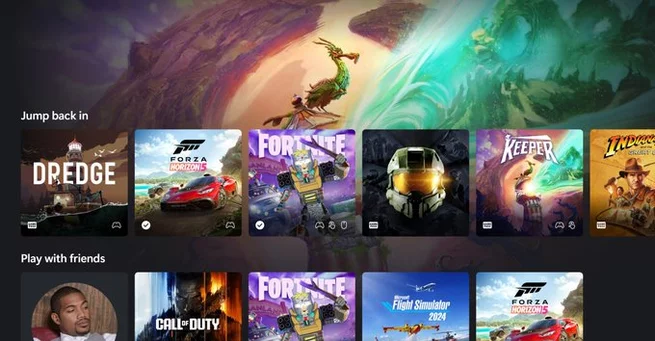
One of the most noticeable aspects of the Xbox Cloud Gaming new design is how closely it mirrors a real Xbox console UI. Rounded edges, fluid transitions, and layered panels replace the older, flatter web-style layout. The result feels less like browsing a website and more like powering on a console.
Animations play a central role in this transformation. Panels slide naturally into view instead of abruptly loading, which reduces friction and makes navigation feel intentional. Even small touches, such as animated icons that react as you move through the interface, help reinforce the console-first feel. These refinements may seem subtle, but together they dramatically change how the platform feels in everyday use.
Improved Navigation Makes Cloud Gaming Feel Native
Navigation has been a long-standing challenge for cloud-based platforms, and Microsoft appears to be tackling that head-on. The Xbox Cloud Gaming new design introduces smoother transitions between sections, making movement across the dashboard feel continuous rather than segmented. This reduces the sensation of waiting for separate pages to load.
Menus now feel more connected, guiding players logically from their game library to social features and settings. The experience is especially noticeable on mobile devices, where responsiveness and clarity are critical. By focusing on flow and consistency, Microsoft is addressing one of the biggest pain points of cloud gaming interfaces.
A Dedicated Library Section Brings Clarity
A new library section is another standout feature of the refreshed UI. This area organizes available games more clearly, making it easier to find titles you’ve played recently or want to try next. Instead of feeling buried within menus, the library now feels like a core part of the experience.
For users juggling large catalogs, this change adds real value. Visual hierarchy is clearer, and game tiles feel more prominent and easier to scan. This aligns with modern UI trends that prioritize speed and clarity, particularly for players jumping into quick sessions rather than long playtimes.
Animations Add Personality Without Slowing Things Down
Animations in the new Xbox Cloud Gaming interface are designed to enhance, not distract. A redesigned Xbox icon subtly lights up and shifts shape as you interact with the dashboard, adding a sense of identity to the platform. Sliding panels and gentle motion cues help users understand where they are and where they’re going.
Crucially, these effects do not feel heavy or sluggish. Performance remains smooth, which is essential for cloud gaming where latency is already a concern. The balance between visual flair and responsiveness suggests careful attention to user experience rather than superficial design changes.
Microsoft Positions the UI as a Long-Term Foundation
According to Microsoft, this redesign is not a one-off experiment. The company describes the Xbox Cloud Gaming new design as the foundation for accelerating future player experiences. That wording signals a broader strategy, where cloud, console, and browser-based experiences share a common design language.
This approach makes sense as Xbox continues to blur the line between hardware and cloud services. A unified UI allows players to move seamlessly between devices without relearning controls or layouts. Over time, this could make the Xbox ecosystem feel more cohesive than ever before.
What This Means for the Future of Xbox Consoles
While the preview is focused on cloud gaming, the implications extend far beyond browsers. The console-like nature of the design strongly suggests that future Xbox hardware and software updates may adopt similar elements. In many ways, this feels like a testing ground for ideas that could later appear on physical consoles.
For players, this hints at a future where Xbox experiences look and feel consistent regardless of how you play. Whether on a console, phone, or laptop, the interface could soon feel familiar and unified. That consistency builds trust and reduces friction, both key factors in long-term platform loyalty.
Early Signs Point to a More Unified Xbox Ecosystem
The Xbox Cloud Gaming new design is more than a visual refresh. It represents a strategic shift toward a single, flexible Xbox experience that adapts across devices. By improving navigation, introducing a clearer library, and leaning into console-style design, Microsoft is signaling confidence in its cloud-first future.
As testing continues, more refinements are likely before a wider rollout. Still, this preview already offers a compelling glimpse of what’s next. For Xbox fans watching closely, the message is clear: the future of Xbox is not tied to one device, and its interface is evolving to reflect that reality.



Contact Information




Suggested Writers
-

2.5K articles
-

1.3K articles
-

34 articles
-

28 articles



Comment