
Alerts
-
2 minutes, 19 seconds
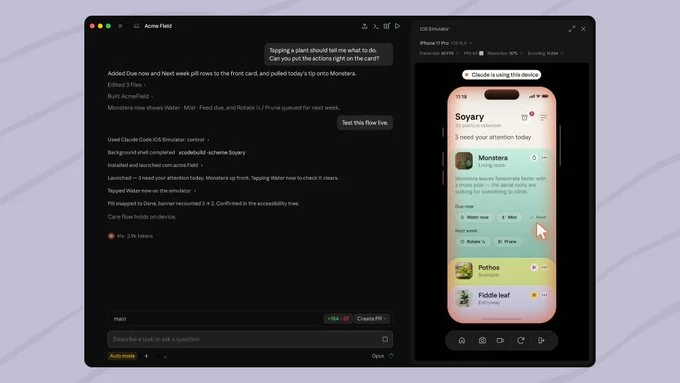
Claude Code has just added a powerful new feature: the ability to build and test iOS apps directly in Apple's Simulator. This update makes it easier than ever for developers to create, debug, and refine mobile applications without leaving their coding environment. In this article, we'll explore what this means for iOS app development and how you can start using it today.
Claude Code is an AI-powered coding assistant that helps developers write, edit, and test code faster. It integrates seamlessly with popular development tools and now supports iOS app development with Apple's Simulator. This means you can build and test your apps in a simulated iPhone or iPad environment, all with the help of Claude's intelligent suggestions.
Getting started is simple. Follow these steps to begin building and testing iOS apps in Apple's Simulator with Claude Code:
Claude Code will automatically handle the build process and launch your app in the Simulator for testing.
To get the most out of Claude Code's new iOS simulator support, keep these tips in mind:
This update is a game-changer for iOS developers. By integrating AI-powered coding assistance with Apple's Simulator, Claude Code reduces the time and effort needed to build high-quality apps. Whether you're a seasoned developer or just starting out, this feature makes iOS app development more accessible and efficient.
As AI continues to evolve, tools like Claude Code will become essential for modern development workflows. Start experimenting with this new feature today and see how it can transform your iOS app development process.










Comment