
Alerts
-
3 minutes, 15 seconds
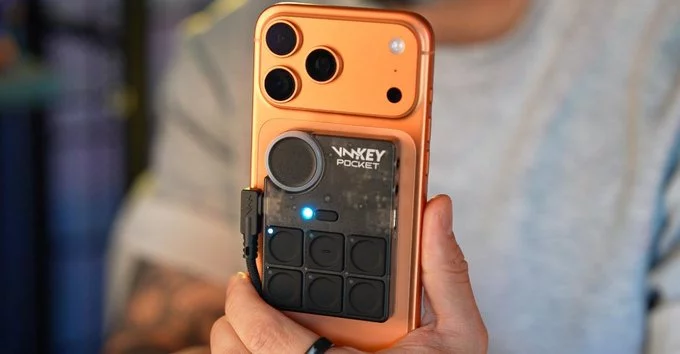
The Key Pocket is a compact device that lets you alter your voice in real time. Whether you are battling friends in an online multiplayer match, broadcasting live to your social media followers, or simply chatting on a call, the Key Pocket gives you a range of voice effects to play with.
Because it works as a standalone unit, you do not need to install complicated software or tie yourself to a single app. The device sits between your microphone and your audience, transforming your voice as you speak. That makes it a flexible tool for gamers, streamers, and anyone who wants a bit more fun or privacy during conversations.
In the sections that follow, we look at how the Key Pocket performs in three common scenarios: multiplayer gaming, social media streaming, and everyday calls.
Multiplayer games are more fun when you can sound like someone else entirely. The Key Pocket lets you change your voice in real time during online matches, so your teammates and opponents hear a different version of you from the very first callout.
Getting started is simple:
Whether you want a deeper tone for a tactical shooter or a lighter voice for a party game, the Key Pocket applies the effect live. There is no need to record clips or edit audio afterwards. Your voice changes as you speak, which makes it ideal for fast-paced multiplayer sessions where reactions matter.
Teammates will hear the altered voice instantly, and you can switch presets between rounds whenever you feel like it. It is a quick way to add personality to your online matches without any complicated setup.
If you broadcast to Twitch, YouTube, TikTok, or any other social platform, your voice is part of your brand. The Key Pocket lets you alter that voice in real time while you stream, so you can build a distinctive on-air persona without investing in studio gear or complex software.
Because the Key Pocket connects directly to your setup, it can sit between your microphone and your streaming software, applying voice effects as you speak. That means your audience hears the altered voice live, not a post-production edit. You can switch between your natural voice and a modified one whenever it suits the moment, whether you are voicing a character, hosting a themed segment, or simply keeping your real identity private.
Streamers who want to stand out can use the Key Pocket to:
With the Key Pocket handling the voice change, you can focus on your content while your altered voice does the talking.
Beyond gaming and streaming, the Key Pocket also works as a voice changer during phone calls. If you want to sound different while talking to someone, the app can alter your voice in real time so the person on the other end hears a changed version of your voice rather than your natural one.
This makes the Key Pocket useful for casual prank calls, playful conversations with friends, or simply experimenting with how you sound. Because the voice change happens live, you do not need to record anything first or edit audio afterwards — you just talk, and the app handles the rest.
It is worth remembering that the Key Pocket is designed as an entertainment tool. The voices it produces are meant for fun, not for impersonation or anything deceptive. Used responsibly, though, it adds a lighthearted twist to ordinary calls and lets you surprise whoever is on the other end of the line.









Comment