Google Images Now Shows You Photos Before You Type a Word
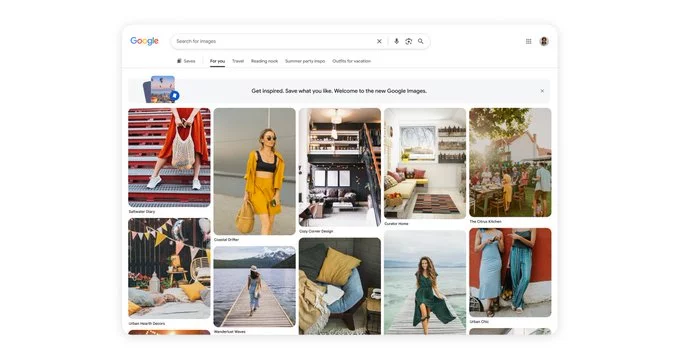
Imagine opening the Google Images homepage and instantly seeing a gallery of beautiful photos, handpicked just for you—even before you search. That’s exactly what Google has started doing. The Google Images homepage will recommend photos even before you search, using your past activity and trending topics to guess what you might like. This change makes finding images faster and more personal than ever.
How Does the New Google Images Recommendation Feature Work?
Google uses your search history, location, and popular trends to suggest photos you might enjoy. For example, if you often search for travel destinations, the homepage might show you stunning beach sunsets or mountain landscapes. If you’re into fashion, you might see the latest outfit trends. The goal is to save you time and make browsing more fun.
Key Features of the Updated Google Images Homepage
- Personalized recommendations: Photos are based on your interests and past searches.
- Trending content: You’ll see popular images from around the web.
- No typing needed: Start browsing instantly without entering a keyword.
- Visual discovery: Explore new topics you might not have searched for.
Why Did Google Make This Change?
Google wants to keep users engaged and make searching more intuitive. By showing recommendations upfront, it mimics how people discover images on social media or photo-sharing apps. This update also helps Google compete with platforms like Pinterest and Instagram, which rely heavily on visual discovery. For everyday users, it means less effort and more inspiration.
Benefits for Regular Users
- Saves time: No need to think of a search term.
- Inspires creativity: Discover new ideas for projects, hobbies, or shopping.
- Feels personal: The homepage adapts to your unique tastes.
Tips to Get the Most Out of Google Images Recommendations
To enjoy better recommendations, make sure you’re signed into your Google account. Your search history helps the system learn your preferences. You can also clear your history if you want a fresh start. If you see a photo you love, click it to explore similar images. This feedback loop helps Google refine its suggestions over time.
Privacy Considerations
If you’re concerned about privacy, you can turn off personalized recommendations in your Google account settings. Go to “Data & personalization” and disable “Web & App Activity.” This will stop Google from using your history to suggest photos. However, you’ll still see general trending images.
What This Means for Bloggers and Marketers
For content creators, this update is a golden opportunity. If your images are optimized for Google Images, they have a higher chance of appearing in these recommendations. Use descriptive file names, alt text, and high-quality visuals. Focus on trending topics to increase visibility. This feature can drive more organic traffic to your website or blog.
The Google Images homepage is no longer just a blank search bar. It’s now a smart, visual discovery tool that brings the world of photos to your fingertips. Whether you’re looking for inspiration, shopping ideas, or just something beautiful to look at, these recommendations make the experience smoother and more enjoyable. Try it out today—you might find something amazing without typing a single word.














Comment