Alerts

-
3 minutes, 21 seconds
Supercharge Your Kindle Scribe Note-Taking Workflow
Looking to level up your kindle scribe note-taking game? You’re not alone. Many users love the Kindle Scribe for its e-ink display and writing experience but don’t always explore its full potential. Whether you're a student, remote worker, or avid reader with thoughts to capture, optimizing how you use the Kindle Scribe can dramatically enhance your productivity. With just a few tweaks and feature adjustments, you can transform your device from a basic e-reader into a streamlined digital notebook that travels easily with you.
Why Kindle Scribe Is Built for Note-Taking First
The Kindle Scribe isn’t trying to replace your tablet—it’s here to do one thing exceptionally well: help you focus. With a distraction-free interface and support for handwriting and typed notes, it’s an ideal tool for journaling, annotating documents, and organizing ideas. Unlike multi-function devices like iPads, the Scribe’s simplicity keeps you locked into what matters: your thoughts. Thanks to a combination of AI-enhanced tools and cloud syncing, kindle scribe note-taking becomes not just efficient, but enjoyable. You get to annotate books, mark up PDFs, and create notebooks that are searchable and shareable.
Smart Features That Give Kindle Scribe Note-Taking Superpowers
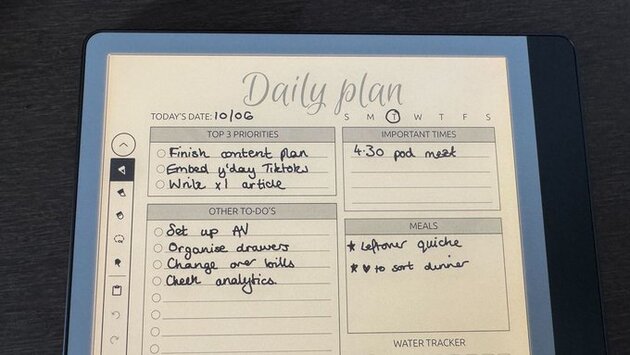
Want to get the most out of your Kindle Scribe? Start with custom templates for meeting notes, daily logs, or project planning. Use the built-in handwriting-to-text feature to turn scribbles into digital text—perfect for searchable notes or polished documents. You can also send files to your Kindle via email or app and mark them up directly. Another powerful tip? Use folders to organize notes by topic or project. These small changes dramatically improve how you use kindle scribe note-taking in real-time, whether you're at your desk or on a flight.
Is Kindle Scribe Right for Your Workflow?
If your day involves reading, brainstorming, or meetings, the Kindle Scribe makes a strong case as your daily companion. While it won’t replace a full tablet, it’s a much lighter and focused option for professionals and creatives who rely on clarity and minimalism. The device’s long battery life and paper-like writing experience remove common distractions, helping kindle scribe note-taking become more about clarity and less about clutter. Once you tap into its hidden features, you’ll wonder how you ever managed your notes without it.










Comment