


Samsung One UI 8 Beta Launches on Galaxy S25 with AI Features
-
3 minutes, 34 seconds
Want to try Samsung’s latest One UI 8 on your Galaxy S25 before anyone else? Now’s your chance! Samsung has officially launched the beta for its new One UI 8 interface, which is based on Android 16. Galaxy S25, S25 Plus, and S25 Ultra users in the US, UK, Germany, and South Korea can access this beta today through the Samsung Members app. However, S25 Edge users might have to wait a bit longer, as this device is not yet included in the rollout.
The biggest buzz around One UI 8 centers on its AI-powered upgrades, designed to deliver faster performance, smarter personalization, and seamless multitasking. With AI Select, you’ll notice an instant response compared to previous versions, thanks to reduced start-up delays. Samsung has fine-tuned this release for its foldable devices and tablets, hinting at a smoother, more responsive experience whether you’re using a Galaxy Z Fold 7 or a Galaxy Tab.
A standout feature in One UI 8 is the new split-screen multitasking option. This allows you to move one app partially off-screen, creating a more dynamic workspace—similar to features found on the OnePlus Open. For professionals and multitaskers, this offers a significant productivity boost.
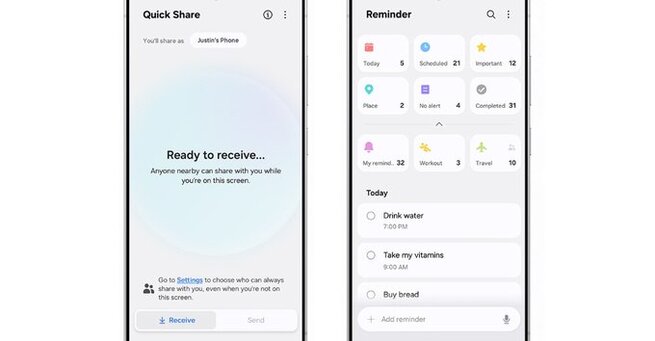
Samsung didn’t stop there. The Reminder app now boasts a refreshed layout, making it easier to organize tasks and share to-do lists. Quick Share has been streamlined for effortless file sharing across Galaxy devices. Plus, Android 16’s Auracast support brings enhanced accessibility, enabling hearing aids and earbuds (including the new Galaxy Buds 3) to connect to public audio streams at events or announcements.
This early access to One UI 8 is part of Samsung’s push to align with Google’s broader Android 16 goals—especially around foldable optimization and AI enhancements. Expect a full rollout of One UI 8 this summer, likely coinciding with the launch of Samsung’s next-generation foldables, including the Galaxy Z Fold 7 and Z Flip 7.
If you’re wondering how to join the beta, it’s simple: just open the Samsung Members app, navigate to the beta section, and enroll. Keep in mind that beta versions might contain bugs, so it’s best to back up your data beforehand.
This update marks a shift in Samsung’s software strategy, promising quicker updates, more advanced AI features, and a refined user experience that blends style with functionality. Whether you’re a power user or just curious about the latest tech, One UI 8 offers a taste of what’s next for Samsung’s Android devices.



Contact Information





Suggested Writers
-

2.5K articles
-

1.3K articles
-

34 articles
-

28 articles



Comment