
Alerts
-
3 minutes, 5 seconds
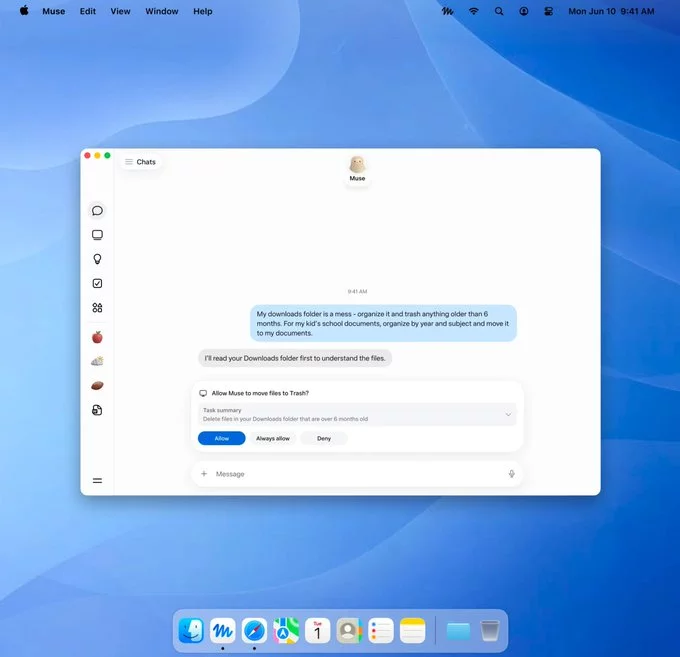
Muse is now available on the Mac. The launch brings the same assistant experience Mac users have been waiting for to Apple's desktop platform, and it arrives with a clear focus: working alongside you rather than simply answering questions.
Rather than living in a single window, Muse is built to fit into the way you already use your computer. It is designed to work with your files and your apps, and it can take action on your behalf — not just offer suggestions, but carry tasks through. For anyone who has followed Muse on other platforms, this release marks the moment the assistant becomes part of the Mac desktop itself.
The arrival is more than a port. It signals that Muse is treating the Mac as a first-class home, with the same capabilities that define it elsewhere. In the sections that follow, we look at how Muse works with your files and apps, how it takes action on your behalf, and what all of this means for Mac users specifically.
Muse is built to fit into the way you already work on your Mac, rather than forcing you into a new set of tools. It can work directly with your files and apps, so the things you rely on every day stay within reach.
That means you don't have to move documents into a separate workspace or rebuild your workflow around a new service. Muse meets your existing setup where it is and works alongside it.
For Mac users, this continuity matters. Your files stay where you keep them, and your apps remain part of the process. Instead of juggling between disconnected tools, you can let Muse handle tasks while you continue working the way you prefer.
The result is a more natural experience: your content, your applications, and Muse operating together on the same machine.
Muse can take action on your behalf. Rather than stopping at answering questions, it can carry out tasks directly, turning a request into a completed result. This makes it more than a conversational tool: it is an assistant that does things, not just one that talks about them.
Because Muse works with your files and apps, the actions it takes are grounded in your actual setup. It can operate within the environment you already use on your Mac, so the work it performs fits naturally into your existing workflow.
This shift matters. When an assistant can act, you spend less time switching between apps and manually carrying out each step yourself. You describe what you need, and Muse handles the doing.
For Mac users, that means a more capable kind of help — one that moves from suggestion to execution, on your behalf and within the tools you rely on every day.
The arrival of Muse on Mac changes what you can expect from your desktop. Because Muse works with your files and apps, and can take action on your behalf, Mac users gain an assistant that fits into the way they already work rather than forcing a new routine.
In practice, this means you can hand off tasks that would otherwise interrupt your focus, confident that Muse can reach the files and applications involved. Instead of switching between windows and manually carrying out each step, you can describe what you need and let Muse handle it.
For Mac users, the benefits are straightforward:
Muse on Mac is available now, so these capabilities are within reach today.










Comment