Microsoft Paint Adds AI Coloring Book Feature: What You Need to Know
Microsoft is bringing AI-powered creativity directly to your desktop. The latest Windows 11 updates are introducing surprising features to two of its simplest apps: Paint and Notepad. Among these updates is a new “Coloring book” tool in Paint that generates unique, ready-to-color illustrations from simple text prompts.
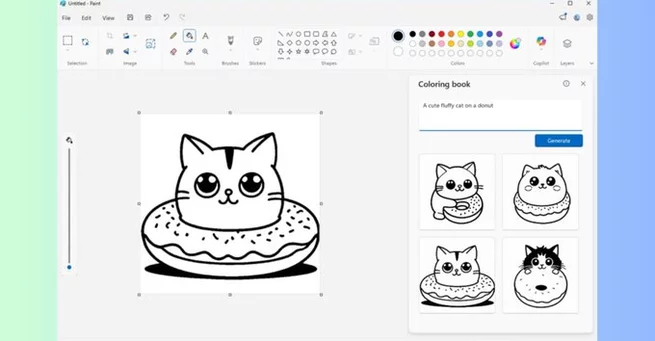
Whether it’s a whimsical cat on a donut or a fantasy landscape, users can now create instant coloring pages without leaving their computer. The updates are rolling out to Windows Insiders in the Canary and Dev channels, giving early adopters a first look at Microsoft’s AI ambitions for even its most basic apps.
Paint’s AI Coloring Book: A Playful Experiment
The new Coloring book feature in Paint (version 11.2512.191.0) allows users to turn any text prompt into a blank illustration suitable for coloring. By selecting the Coloring book option in the Copilot menu, users can describe a design they want, like “a cute fluffy cat on a donut,” and Paint instantly generates four variations.
Once a design is selected, users can either color it digitally using Paint’s tools or print it out for traditional coloring. Microsoft has also added a fill tolerance slider to Paint, giving more precise control over how colors are applied—making the coloring process smoother and more customizable.
Notepad Gains AI Text Enhancements
Windows 11’s Notepad is also seeing AI upgrades in version 11.2512.10.0. The app now streams AI-generated responses for Write, Rewrite, and Summarize features. This means users can see text results in real-time as they are generated, rather than waiting for the full response.
These enhancements highlight Microsoft’s push to make AI integration more practical and interactive across even the simplest productivity tools. While Notepad’s upgrades lean toward writing efficiency, Paint’s coloring feature feels more experimental, blending creativity with AI novelty.
Who Will Use AI Coloring in Paint?
The AI Coloring book feature is limited to Copilot Plus PCs, suggesting Microsoft is exploring ways to make its AI-powered devices stand out. While it’s fun to imagine parents or stressed-out millennials generating instant coloring pages, the real motivation may be marketing Windows 11’s AI capabilities in an accessible and quirky way.
Even so, the feature demonstrates a trend: AI is not just for complex tasks like coding or image editing—it’s moving into everyday creative experiences. Simple apps like Paint are becoming gateways for experimentation and entertainment, showing that even nostalgia-driven tools can be modernized.
The Bigger Picture for Microsoft AI
By adding AI to Paint and Notepad, Microsoft is signaling its long-term strategy: integrate AI across its ecosystem in ways that are visible and playful. Features like Coloring book may seem niche, but they make AI approachable, letting users see its creative potential firsthand.
As these tools roll out more widely, it will be interesting to see whether users embrace them or if they remain a curiosity for Windows enthusiasts. Either way, Microsoft is proving that even the simplest apps can surprise us with AI-driven innovation.





Array