Alerts

-
3 minutes, 30 seconds
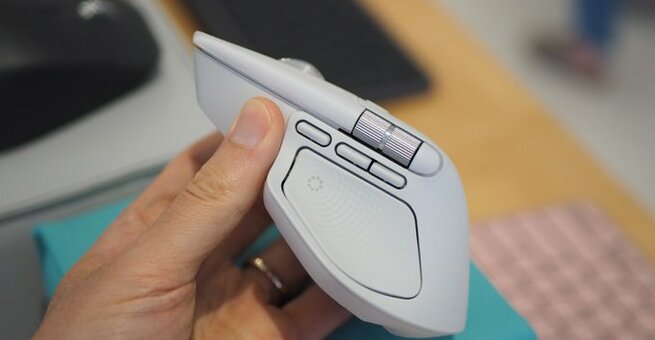
If you’ve been waiting for Logitech’s next big upgrade, here it is—Logitech’s MX Master 4 adds haptic feedback, mostly just for fun. The $119.99 wireless mouse, launching in October and already up for preorder at Amazon and Best Buy, introduces a unique twist: haptics baked right into its design.
But before you imagine gaming-style rumble effects while browsing YouTube, this is different. The MX Master 4 isn’t about immersion—it’s about adding subtle, satisfying vibrations to everyday productivity tasks.
The star of the show is the Haptic Sense Panel built into the grippy thumb rest. When pressed, it activates Logitech’s Action Ring overlay, which you can customize with app shortcuts, system commands, or even multiple nested rings for deep workflows.
Unlike Logitech’s upcoming Pro X2 Superstrike gaming mouse (due in 2026 with a haptics-based click system), this mouse leans more toward creativity and productivity.
Every interaction with the MX Master 4—whether it’s gestures, Action Rings, or Smart Actions—comes with a light haptic “buzz.” It’s not just gimmicky; it adds a tactile layer that makes shortcuts feel more engaging.
One standout feature is hidden by default. You can enable haptic feedback when switching between screens, helping you keep track of your cursor across multiple monitors. It’s a small touch, but one that can save time and reduce frustration.
As with most of Logitech’s high-end gear, the real magic happens through its Logi Options Plus software. The haptic features are deeply tied to this app, so you’ll need to dive in if you want to unlock the mouse’s full potential.
While casual users may just scratch the surface, power users who love custom workflows will likely find the haptics fun, useful, and surprisingly addictive.
The Logitech MX Master 4 doesn’t reinvent productivity, but it does make it feel more enjoyable. Haptic feedback won’t be for everyone, yet it’s hard not to smile when your mouse gives you a little buzz to confirm a shortcut.
For $119.99, it’s priced similarly to previous MX Master releases, making it a tempting upgrade for fans of the series—or anyone curious about how haptics can change the way we work.










Comment