Logitech has solved a long-standing keyboard debate by creating a single keyboard that combines analog and mechanical switches. Instead of forcing you to choose between the two very different switch types, this new design lets you mix and match them based on your personal preferences. Whether you need precision for gaming or a satisfying feel for typing, you can now have both in one device.
What Makes This Keyboard Different?
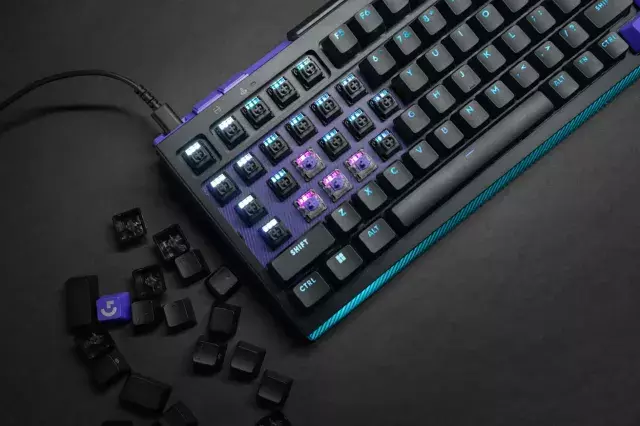
Most keyboards stick with one switch type. Mechanical switches are known for their tactile feedback and durability. Analog switches, on the other hand, offer variable input—like pressing a key lightly for a slow walk in a game or harder for a sprint. Logitech’s hybrid keyboard lets you use both types on the same board. For example, you could install analog switches on the WASD keys for gaming control and mechanical switches on the rest for comfortable typing.
How the Mix-and-Match System Works
The keyboard uses a unique hot-swappable design. You can remove any switch and replace it with another without soldering. This means you can customize each key to your exact needs. Logitech includes both analog and mechanical switches in the box, so you can start experimenting right away.
- Analog switches: Best for games that require precise control, like racing or FPS titles.
- Mechanical switches: Ideal for typing, coding, or everyday use where a crisp clicky feel is preferred.
- Hybrid layout: Place analog on movement keys and mechanical on letters and numbers for a balanced experience.
Why This Matters for Gamers and Typists
If you’re a gamer who also works from home, this keyboard is a game-changer. You no longer need two separate keyboards for different tasks. The ability to customize each key means you can optimize for both performance and comfort. For instance, you can set analog switches to respond faster for in-game actions while keeping mechanical switches on the spacebar and enter key for reliable daily use.
Tips for Getting the Most Out of This Keyboard
To maximize your experience, start by identifying which keys you use most in games. Usually, that’s WASD, Q, E, R, and the spacebar. Swap those to analog switches for better control. For everything else—like typing emails or coding—leave mechanical switches in place. You can also experiment with different switch types for specific games. Racing sims, for example, benefit from analog acceleration on the A and D keys.
Logitech’s analog and mechanical hybrid keyboard is a smart solution for anyone tired of compromising. It offers the best of both worlds in a single, customizable package. Whether you’re a competitive gamer, a professional writer, or just someone who loves great hardware, this keyboard gives you the freedom to build your perfect typing experience.














Comment