
Alerts
-
2 minutes, 10 seconds
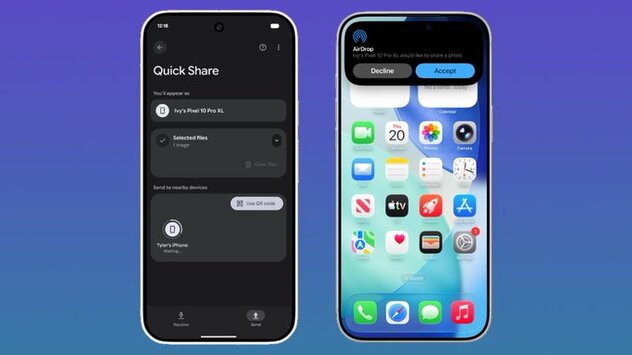
iPhone users can now AirDrop files to Android devices, marking a major step in cross-platform sharing. With Apple’s AirDrop and Google’s QuickShare on Pixel 10 series devices, users can send photos, videos, and documents seamlessly between iOS and Android. This long-awaited feature answers one of the most common questions: “Can iPhone share files with Android?”
To send files from an iPhone to a Pixel 10 device, you need to set AirDrop visibility to Everyone for 10 Minutes. Once enabled, the Android device receives a notification identical to a regular AirDrop prompt. On the Pixel side, users must enter Receive mode in QuickShare or enable the same 10-minute visibility setting. Files are saved directly to the Files app, ensuring smooth organization.
Yes, the interoperability between AirDrop and QuickShare includes multi-layered security. Transfers are peer-to-peer, bypassing any server, and both devices display each other’s names for verification. Users must consent before a file is received, and platform protections on both iOS and Android prevent unauthorized access, keeping your data safe during sharing.
Currently, AirDrop to Android works with Apple devices such as iPhone, iPad, and Mac and Google’s Pixel 10, Pixel 10 Pro, Pixel 10 Pro XL, and Pixel 10 Fold. Google is exploring future support for “Contacts Only” mode to simplify sharing further. For now, the Everyone for 10 Minutes mode is the fastest way to start cross-platform file transfers.









Comment