
Alerts
-
3 minutes, 16 seconds
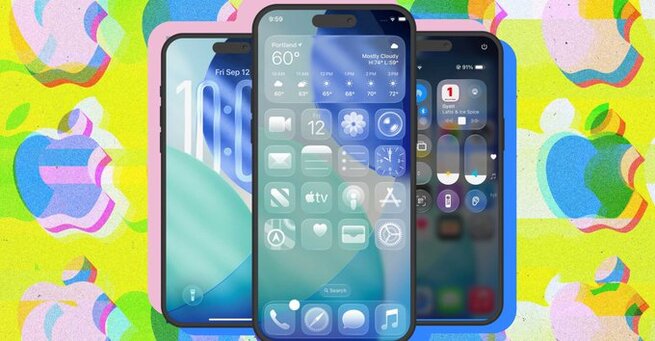
Apple’s iOS 26 update introduces the new Liquid Glass design, a bold shift in how the iPhone looks and feels. If you’ve been wondering what’s new in iOS 26, the biggest change is the glass-inspired redesign that makes your apps, menus, and notifications look sleeker than ever. The Liquid Glass effect brings transparency, depth, and reflective edges, giving your iPhone an entirely refreshed aesthetic that feels both futuristic and intuitive.
The iOS 26 Liquid Glass redesign is Apple’s latest design language that gives every part of your iPhone a polished, glass-like sheen. App icons now appear as though carved from crystal, with soft edges and reflective details. When you interact with text, magnification appears as a floating glass bubble, making everything easier to view. Even Safari adopts this update, with websites sliding seamlessly beneath translucent menus and navigation buttons.
Beyond looks, the iOS 26 Liquid Glass design is built to improve usability. Notifications feel lighter as they float onto the screen, while the Control Center buttons catch light depending on how you tilt your phone. This subtle interaction makes using your device more natural and engaging. Apple has also optimized performance to ensure that the redesigned visuals don’t slow down navigation, keeping the experience smooth and responsive.
The Liquid Glass update in iOS 26 is more than just cosmetic. It reflects Apple’s push toward immersive, adaptive design that responds to user movement and enhances clarity. For many iPhone owners, this update makes everyday tasks—like reading messages, browsing Safari, or managing apps—more visually appealing and easier to interact with. It’s a step forward that redefines how design and functionality blend on mobile devices.
Once you install iOS 26, your iPhone will feel brand-new thanks to the Liquid Glass effect. From the dock at the bottom of your screen to the way light reflects on buttons, everything looks more polished. Whether you care about design or not, the update makes everyday interactions smoother and visually richer. For iPhone users, iOS 26 marks one of the most noticeable redesigns in years, setting the tone for future updates.








Comment