Alerts

-
2 minutes, 38 seconds
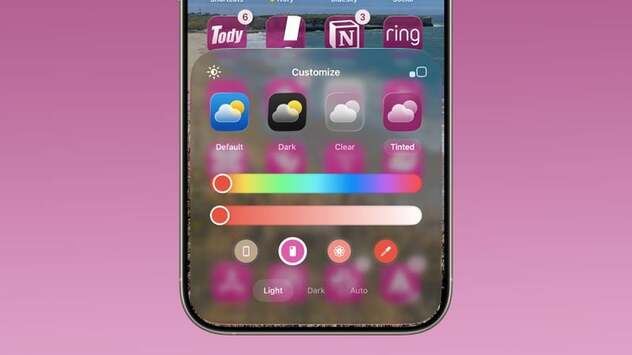
Personalization takes center stage in iOS 26, and one standout feature is the new iOS 26 icon tint option. This feature allows iPhone users to match their Home Screen icons to the color of their iPhone case or even the device itself. Designed to create a cohesive and stylish look, the update makes your iPhone feel more customizable than ever before. Many iPhone owners have been curious about how icon tinting works, and the process is both simple and visually appealing.
When you long-press on the Home Screen and tap the customize option, you’ll notice a new iPhone case icon in the “Tinted” menu. Selecting it automatically changes your icons’ color to match the MagSafe case you’re using. If you prefer, you can also select the iPhone icon to match the tint to your device color instead. This streamlined process makes it easy to switch between different looks in seconds.
The iOS 26 icon tint is designed to work seamlessly with MagSafe cases. Once the iPhone detects the case color, it applies a matching tint across all icons and widgets. However, if your case doesn’t show the colorful MagSafe ring when attached, the feature likely won’t be supported. This ensures a smooth integration between your iPhone and Apple-certified accessories, giving your device a premium and consistent appearance.
Apple didn’t stop at simple color matching. Icons with tint in iOS 26 adopt a unique Liquid Glass look, which introduces added translucency and depth. This subtle design change makes your Home Screen appear more dynamic, stylish, and polished. Combined with widgets, the Liquid Glass finish ensures your iPhone feels more modern and visually unified, elevating both style and functionality.









Comment