
Alerts
-
4 minutes, 49 seconds
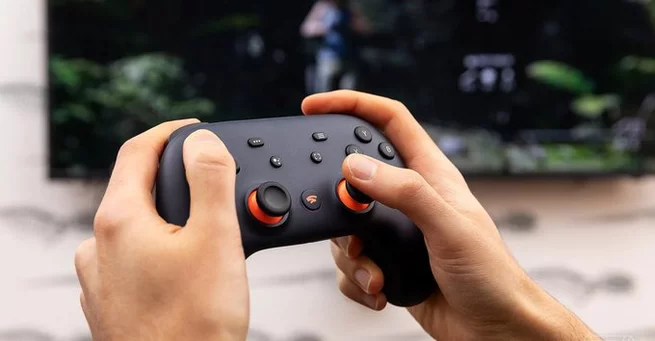
If you thought your Google Stadia controller was destined for the tech graveyard, think again. After Stadia shut down in January 2023, many owners were left with a Wi-Fi–dependent gamepad seemingly useless outside Google’s cloud gaming service. But now, Steam has given the device a new lease on life. The controller is fully supported on Steam and SteamOS, making every button and joystick fully customizable.
Originally, the Stadia controller connected to Wi-Fi to play games streamed from Google’s servers. When the service ended, Google offered full hardware refunds and the ability to convert the controller into a generic Bluetooth device. While this saved the hardware from being obsolete, full Steam integration seemed unlikely—until now. Valve has not only enabled recognition of the controller but has mapped all buttons to work intuitively within Steam and SteamOS.
One of the biggest surprises is the repurposing of Google-specific buttons. The Google Assistant key can now function as an M1 macro, the screenshot button works with SteamOS, and the Stadia button acts like an Xbox button. This allows shortcuts like Stadia+A to open the quick access menu, Stadia+Right Stick to summon a mouse cursor, and Stadia+Left Stick to adjust volume or brightness. On desktop, it can even launch Steam’s Big Picture Mode.
Steam’s full support transforms the controller from a novelty into a practical tool for PC gaming. While it may not beat top-tier controllers for comfort or ergonomics, its newly unlocked functionality gives players flexibility that many other older or niche controllers lack. For Stadia fans or anyone who snagged the controller cheaply during Google’s wind-down, this is a rare chance to breathe new life into old hardware.
The decision comes as a surprise given Valve’s previous prioritization of other devices like the Xbox One wireless adapter. The Stadia controller is now treated as a first-class citizen in Steam, proving that even discontinued hardware can find relevance in new ecosystems. Valve’s move shows a growing trend: companies embracing older devices to maximize user engagement rather than leaving them in limbo.
To unlock the controller’s full potential, connect it via Bluetooth or USB and let Steam detect it. From there, users can remap buttons, assign macros, and integrate it seamlessly into Steam Deck or desktop setups. The versatility now rivals many purpose-built gamepads, giving gamers a fun, low-cost option for PC play.
This update isn’t just about nostalgia—it’s about sustainability and utility. Hardware that might otherwise be discarded now has meaningful use. It also highlights Steam’s commitment to supporting diverse input devices, ensuring that gamers can continue to enjoy custom setups without buying new peripherals. For anyone still holding a Google Stadia controller, now is the perfect time to reconnect with it.
The Google Stadia controller has officially escaped obsolescence. Thanks to full Steam and SteamOS support, players can now enjoy a flexible, customizable gamepad with unique shortcuts and macros. If you’ve been holding onto yours, it’s time to plug it in and rediscover what this abandoned device can really do.









Comment