Alerts

-
3 minutes, 34 seconds
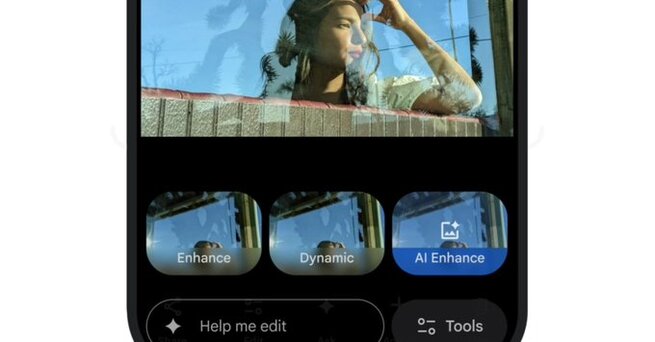
Google Photos is rolling out a game-changing feature for iPhone users: the ability to edit images by simply describing changes. Whether through voice or text, users can now instruct Google Photos to modify their photos with the help of advanced AI tools. This marks a significant step forward in photo editing, allowing for a more personalized and hands-off experience. Here’s everything you need to know about this exciting new feature and what it means for your photos.
Google Photos' new "Help Me Edit" feature allows iPhone users to describe changes they want to make to their photos using either text or voice. Once you've mentioned your desired edits, the app's AI takes over to bring those changes to life. Whether you want to brighten the background, remove unwanted objects, or smooth skin, you can now tell Google Photos exactly what you're looking for.
The feature also introduces a redesigned user interface (UI), making it easier than ever to adjust your images with just a few taps. With AI-powered one-tap suggestions, users can quickly enhance their photos with minimal effort.
Google Photos’ facial editing capabilities have received a major upgrade, now allowing more accurate modifications to faces within your photos. Whether it's removing glasses, opening eyes that were blinked, or adding a smile, the AI can make these changes by referencing images of the people in your gallery. This level of precision makes portrait edits much more natural and realistic.
The update also incorporates Google’s Nano Banana AI model, which enhances the ability to transform photos into artistic styles such as paintings or mosaics. This model brings a fresh creative dimension to photo editing, letting you turn everyday snapshots into unique art pieces with just a few instructions.
In addition to the conversational editing tools, Google Photos now features an "Ask" button for both iOS and Android users. This button opens a chatbot-style interface, allowing users to request edits or ask about specific details within their photos. It’s a dynamic way to interact with your images and get the exact results you want without scrolling through multiple menus.
Android users also gain access to ready-made AI templates, which offer popular prompts like "turn me into a high-fashion model" or "add a sunset to the background." These templates streamline the editing process, making creative edits quicker and more accessible to all users.









Comment