
-
5 minutes, 22 seconds
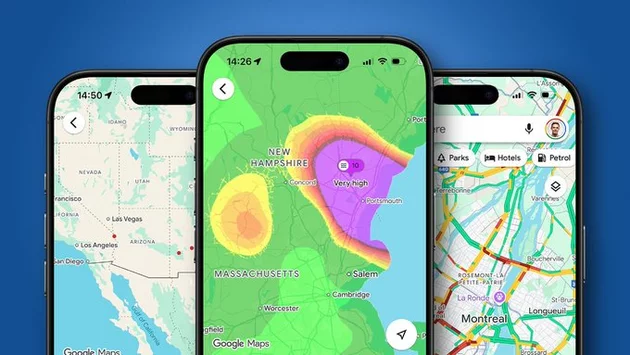
Google Maps is an essential app for millions, yet most people barely scratch the surface of its capabilities. Many users type in a destination, glance at the route, and start driving, unaware of tools that could save time, reduce stress, and make exploring a city much easier. One simple setting completely changed how I navigate daily, and it could do the same for you.
This setting, called “map details,” unlocks layers of information that dramatically improve your Google Maps experience. From live traffic updates to public transport overlays, this feature gives you control over how you plan your trips and explore your surroundings.
At first glance, map details might seem like a minor feature, but it packs a surprising amount of functionality. Essentially, it adds layers and overlays on top of Google Maps’ standard view, whether you use the default map, satellite, or terrain mode.
These layers can display everything from real-time traffic to public transit routes, bike-sharing stations, and more. By simply enabling map details, you gain insights that go far beyond basic directions. No longer do you have to guess which roads are congested or which route is fastest during rush hour.
One of the most useful map details overlays is live traffic information. When activated, Google Maps highlights roads in different colors: green for clear routes, yellow for moderate traffic, and red for heavy congestion.
This visual guide allows you to instantly see which streets to avoid, saving precious time and reducing the frustration of getting stuck in jams. Whether commuting to work, heading out on a road trip, or navigating an unfamiliar city, live traffic overlays are a game-changer.
For those who rely on public transportation, map details can completely simplify your journey. Google Maps shows train stations, bus stops, and bike rental locations directly on your map. In cities with metro systems, each line is color-coded, making it easy to follow your route without constantly checking schedules.
This feature is especially helpful for visitors exploring a new city. Instead of endlessly searching for transit apps or paper maps, you can see your options at a glance, making travel planning smoother and less stressful.
Map details aren’t just about traffic and transit—they also enhance your ability to explore your area. Want to see walking paths, parks, or trails? Google Maps’ overlays highlight these features, helping you find routes and locations you might have missed otherwise.
Even familiar neighborhoods feel new when you start layering information. Whether looking for a quiet street to bike along or finding a shortcut to work, these insights help you navigate more efficiently while uncovering hidden gems along the way.
Activating this feature takes just a few taps. Open Google Maps, tap the layers icon, and select “Map Details.” From there, you can toggle different overlays depending on your needs—traffic, transit, biking, or terrain.
Once enabled, map details become your go-to tool for every trip. Whether you’re driving, biking, or walking, this small setting transforms Google Maps from a basic navigation app into a powerful planning companion.
Many Google Maps users stick to the default settings, missing out on features that save time and reduce stress. The map details option enhances every aspect of navigation: it helps avoid traffic, simplifies public transit, and uncovers local routes.
Once you start using map details, it’s hard to go back. This one small adjustment makes exploring, commuting, and traveling far more efficient—and much more enjoyable. A few taps could change how you use Google Maps forever.

2.5K articles

1.4K articles

34 articles

28 articles














Comment