Alerts

-
2 minutes, 33 seconds
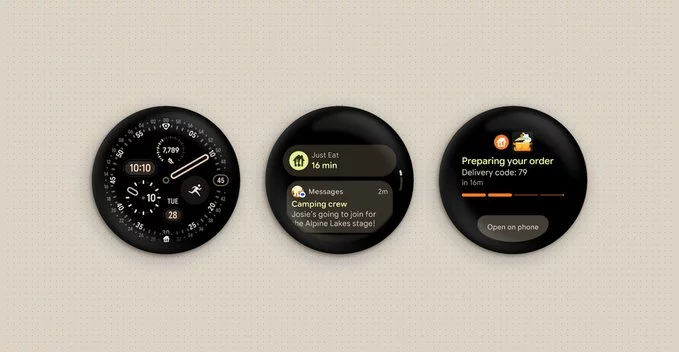
Google has officially launched Wear OS 7, bringing two major upgrades to your smartwatch: Live Updates and a significant battery life boost. This update makes Wear OS smarter, more useful, and easier to use throughout the day. If you own a compatible smartwatch, you'll notice a smoother, more helpful experience right away.
Live Updates are real-time, glanceable notifications that keep you informed without opening apps. Think of them as smart cards that show you exactly what's happening now.
These updates appear on the watch face, so you don't have to swipe or tap. This makes Wear OS 7 feel more like a personal assistant that keeps you in the loop.
Battery life has always been a pain point for smartwatch users. With Wear OS 7, Google focuses on power efficiency. The new system uses less energy when the watch is idle, and Live Updates are designed to be lightweight.
What this means for you:
Beyond Live Updates and battery life, Wear OS 7 includes several refinements that improve the overall experience.
The operating system feels snappier. Apps open faster, and swiping between screens is more fluid. This makes everyday tasks like checking messages or setting timers much quicker.
Wear OS 7 introduces new health tracking tools, including deeper sleep analysis and automatic workout detection. It also works better with popular fitness apps like Strava and MyFitnessPal.
Wear OS 7 rolls out to existing devices from brands like Samsung, Fossil, and Mobvoi. New smartwatches will ship with the update pre-installed. Check your watch's settings to see if the update is available.
To enjoy the new features, follow these simple tips:
Yes. Wear OS 7 is a meaningful upgrade that addresses two of the biggest complaints about smartwatches: battery life and useful notifications. The Live Updates feature alone makes the watch more practical for daily use. If you're in the market for a new smartwatch or already own a Wear OS device, this update makes the experience much better.









Comment