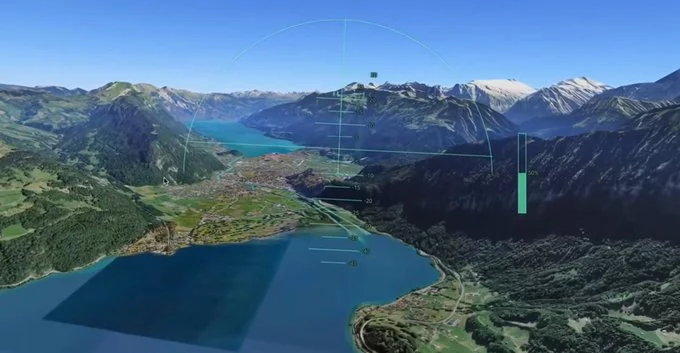
Try Google Earth’s Flight Simulator in Your Browser Now – No Download Needed
-
3 minutes, 0 seconds
Fly Anywhere on Earth with Google Earth’s Flight Simulator
Google Earth’s flight simulator is now available directly in your browser, no software installation required. This means you can pilot a virtual plane over your hometown, famous landmarks, or remote landscapes using just your web browser. The feature brings the thrill of flight simulation to everyone, making it easy to explore the world from a bird’s-eye view.
What Is Google Earth’s Flight Simulator?
It’s a built-in tool that lets you fly a plane through Google Earth’s 3D map. You control the aircraft using your keyboard or mouse, soaring over cities, mountains, and oceans. Originally available only in the desktop app, it now works in browsers like Chrome, Firefox, and Edge. This update makes it more accessible than ever.
How to Access the Flight Simulator in Your Browser
Getting started is simple. Follow these steps:
- Open Google Earth in your web browser (earth.google.com).
- Click the Menu icon (three horizontal lines) in the top left.
- Select Flight Simulator from the list.
- Choose your aircraft: a F-16 for speed or a SR22 for easier handling.
- Pick a starting location or use your current view.
- Click Start Flight and use the on-screen controls or keyboard shortcuts.
Keyboard Controls for a Smooth Flight
To make your flight feel real, learn these basic keys:
- Arrow keys – Steer the plane (up/down/left/right).
- Page Up / Page Down – Increase or decrease throttle (speed).
- Spacebar – Pause the flight.
- F1 – Show or hide the control panel.
Why This Update Matters for Travel Lovers and Gamers
This browser-based flight simulator removes barriers. You don’t need a powerful PC or special software. Just a modern browser and an internet connection. It’s perfect for:
- Virtual tourism – Fly over the Grand Canyon, Eiffel Tower, or your childhood home.
- Learning geography – See terrain, rivers, and cities from above.
- Fun and relaxation – Experience flying without leaving your desk.
Tips for the Best Flight Simulator Experience
To get the most out of this tool, try these tips:
- Start with the SR22 plane – it’s slower and easier to control.
- Choose a familiar location first, like your city, to practice steering.
- Use full-screen mode (F11 on most browsers) for a more immersive view.
- Enable 3D buildings in Google Earth settings for realistic urban flying.
- Experiment with different altitudes and speeds to see how the landscape changes.
What Makes This Different from Other Flight Simulators?
Unlike dedicated simulators like Microsoft Flight Simulator, Google Earth’s version is lightweight and free. It uses real satellite imagery, so every flight is over actual locations. You can fly anywhere on Earth, from the Sahara Desert to the Amazon Rainforest. It’s not a full simulation with complex systems, but it’s incredibly fun and educational.
Common Issues and How to Fix Them
If you have trouble, check these solutions:
- Flight simulator option missing? Make sure you’re using the latest version of Google Earth in your browser.
- Slow performance? Close other tabs or reduce graphics quality in Google Earth settings.
- Controls not working? Click on the Earth view first to activate keyboard input.
Start Flying Today
Google Earth’s flight simulator in your browser is a fun, free way to explore the world. Whether you’re a curious traveler, a student, or just looking for a new hobby, give it a try. Open your browser, launch Google Earth, and take to the skies. No downloads, no hassle – just pure flight.








Comment