
-
2 minutes, 37 seconds
Gmail’s Manage Subscriptions Tab Makes Unsubscribing Easy
Feeling overwhelmed by endless promotional emails? Google’s latest Gmail feature has a solution. The new Manage subscriptions tab helps users quickly identify and unsubscribe from unwanted email lists—streamlining inbox cleanup in just a few clicks. Whether you're tired of marketing emails or newsletters you no longer read, Gmail now offers a much easier way to take back control of your inbox.
How Gmail’s Manage Subscriptions Feature Works
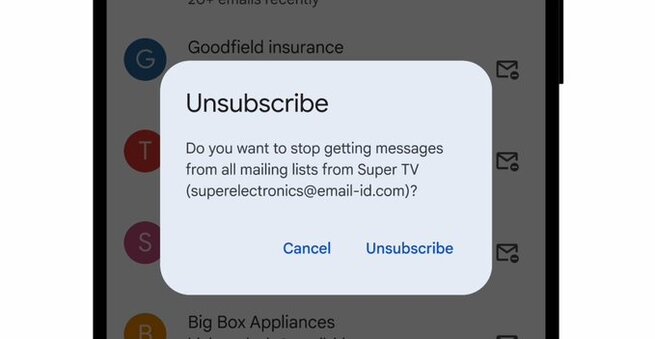
With the Gmail Manage subscriptions tab, your inbox gets a dedicated view showing all active email subscriptions, ranked by how often senders contact you. Each listed sender includes a one-click “Unsubscribe” button—making it simple to opt out without digging through individual messages. This feature gives users insight into who sends the most emails and offers tools to cut the clutter fast.
Where to Find the Gmail Manage Subscriptions Tab
You can access the new feature from Gmail’s navigation menu. Just click the hamburger menu in the top-left corner of your inbox, then select Manage subscriptions. It’s rolling out on the web now, hitting the Android app on July 14, and iOS on July 21. While it may take a couple of weeks to appear for everyone, it’s coming to all personal Gmail accounts and Google Workspace users in select countries.
Why Gmail’s Unsubscribe Tool Matters
Beyond just convenience, the Manage subscriptions tab empowers users to manage email overload more effectively. You’ll see a breakdown of how many emails each sender has sent recently—helping you decide which ones are worth keeping. If you choose to unsubscribe, Gmail will handle it for you by sending the proper request directly. It’s a smart move by Google to improve email productivity while offering users a cleaner, more focused inbox experience.

2.5K articles

1.3K articles

34 articles

28 articles














Comment