
Alerts
-
2 minutes, 3 seconds
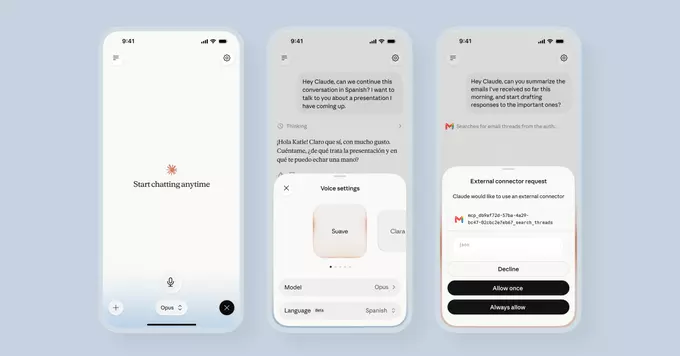
Anthropic has officially launched Claude voice mode for its Opus and Sonnet models. This new feature allows you to talk to Claude naturally, just like speaking to a friend. Instead of typing, you can now ask questions, brainstorm ideas, or get help with tasks using your voice. It’s a big step toward making AI assistants more intuitive and accessible.
Voice mode lets you interact with Claude by speaking. The AI listens to your voice, processes your request, and responds in a human-like tone. This feature is now available for two of Anthropic’s most powerful models: Claude Opus and Claude Sonnet. Whether you’re on a desktop or mobile device, you can start a conversation without lifting a finger.
Voice input can save time and make multitasking easier. For example:
By adding voice to Claude, Anthropic makes AI more natural for everyday use. It’s especially helpful for people with disabilities or those who prefer speaking over typing.
Using the feature is simple. Follow these steps:
Currently, voice mode supports multiple languages, but English works best. Anthropic plans to expand language support soon.
To make the most of Claude’s voice mode:
Remember, voice mode works best in quiet environments. Background noise can reduce accuracy.
Anthropic continues to improve Claude’s capabilities. Voice mode is just one of many updates. Future versions may include real-time translation, emotional tone detection, and deeper integration with apps. For now, Opus and Sonnet users can enjoy a more conversational AI experience.
If you haven’t tried it yet, open Claude today and say hello. Voice mode might change how you think about AI.










Comment