Alerts

-
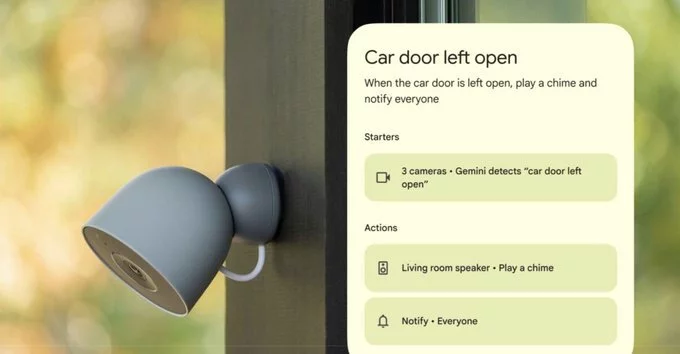
Google Home is rolling out a powerful new Gemini-powered automation feature that lets your security cameras trigger smart home routines based on what they see. Announced as part of the latest Gemini for Home updates, this feature allows your cameras to understand visual cues and automatically adjust your home environment.
For example, if your camera spots you coming home with a yoga mat, it can dim the lights and play relaxing music. This marks a significant step forward in AI-driven smart home technology, following the early access launch of Gemini for Home in October.
Google explains that cameras can now “actually understand what they see,” enabling your smart home to react to almost anything. The feature is currently supported for Nest cameras and select third-party cameras with Gemini Built-In. It is available in English for US users enrolled in the Google Home Public Preview program.
Google recommends describing objects clearly visible to your cameras. Note that the camera needs a brief moment to process what it sees, so this feature is not suitable for instant alerts or security purposes.
You can set up a wide range of automations. For instance, ask Gemini to look for “raccoons near the trash bins” to trigger security lighting, or notify you when it detects mail delivery. You can also track specific vehicles, like a “red BMW enters driveway”, or recognize familiar faces with the Friendly Faces feature.
Once triggered, these visual insights can activate routines such as opening smart blinds, controlling your heating system, or playing music. This creates a seamless, personalized smart home experience.
Google also announced that Gemini for Home now supports multi-action voice commands. You can say, “Lower the blinds, dim the lights, set a 20-minute timer, and start my favorite podcast,” and Gemini will execute all actions at once.
Gemini now responds more quickly to voice commands and provides more consistent and predictable responses to natural language requests, such as asking it to make your room lighting “a little warmer.” These improvements enhance overall usability and reliability.
The camera-triggered automation feature is currently limited to US users in the Public Preview program, but it signals a broader shift toward AI-powered smart home ecosystems. As Google expands Gemini for Home, expect more advanced integrations and wider device support.
For now, users with compatible cameras and a Premium Advanced subscription can start experimenting with visual automations, transforming how their smart home responds to daily life.

6.6K articles

2.8K articles

1.6K articles

34 articles













Comment