
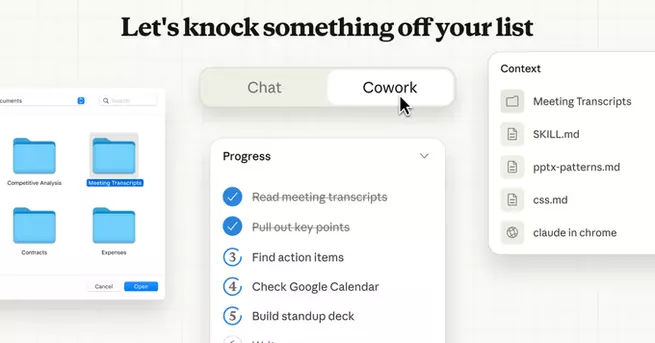
Claude Cowork is Anthropic’s newest experiment aimed at turning its AI assistant into a true digital teammate, not just a chatbot. Launched as a research preview, the feature answers a growing question many users have been asking: can AI actually work alongside humans on everyday tasks? Anthropic says yes—especially for people who don’t code. Available initially through the Claude macOS app, Cowork is designed to manage files, organize information, and handle multi-step workflows with less manual effort from users.
Claude Cowork Expands Anthropic’s AI Agent Vision
Anthropic positions Claude Cowork as a more approachable evolution of its agent tools, especially compared to Claude Code. While Claude Code focuses heavily on developer workflows, Cowork targets knowledge workers, creatives, and professionals juggling messy digital tasks. The company describes it as a way to let Claude “take initiative” inside defined boundaries. By framing the release as a research preview, Anthropic signals that user feedback will shape how far these autonomous features eventually go.
How Claude Cowork Works on Your Computer
At its core, Claude Cowork works by accessing a folder on a user’s computer with permission. Once connected, Claude can read files, edit documents, rename items, and create new content as needed. Anthropic highlights practical examples like sorting cluttered downloads, extracting expenses from screenshots into spreadsheets, or drafting reports from scattered notes. These are tasks many people already do manually, but slowly and inconsistently. Cowork aims to compress hours of digital cleanup into a guided, semi-automated process.
Parallel Tasks Make Claude Cowork Feel Collaborative
One of Cowork’s standout features is its ability to handle tasks in parallel rather than one at a time. Users don’t need to wait for Claude to finish before adding more instructions or feedback. Tasks can be queued, adjusted, and refined as Claude continues working. This creates a more fluid experience that feels closer to collaborating with a human assistant than issuing single, isolated prompts. Anthropic says this reduces the friction of constantly re-explaining context or reformatting outputs.
Claude Cowork Connects Across Apps and Browsers
Claude Cowork also integrates with existing connectors that link it to third-party services like Notion, Asana, and PayPal. Users can extend Claude’s reach beyond local files into project management tools and financial records. When paired with Claude in Chrome, Cowork can also assist with browser-based tasks, adding another layer of flexibility. These integrations reinforce Anthropic’s push to make Claude useful across an entire workflow, not just inside a chat window.
Pricing and Access Limit Claude Cowork—for Now
For now, Claude Cowork is limited to Anthropic’s highest subscription tier, Claude Max. Pricing ranges from $100 to $200 per month depending on usage, placing the feature firmly in the power-user category. Access is also restricted to macOS, signaling a cautious rollout rather than a mass launch. Anthropic appears focused on learning how advanced users interact with AI agents before expanding availability more broadly.
Why Claude Cowork Matters in the AI Race
Claude Cowork reflects a broader shift in the AI industry toward agent-like systems that can act, adapt, and manage real work. Instead of asking AI to generate answers, companies like Anthropic are asking it to do things. If Cowork succeeds, it could redefine expectations for AI assistants in professional settings. For Anthropic, the feature strengthens Claude’s position as not just an intelligent model, but a capable coworker in the evolving AI workplace.









Comment